
Every day, most of us interact with our phones more than we realize, and reminders are part of that rhythm. The idea behind a “daily reminder” is simple: prompt yourself to do something important, whether that’s stretching between work sessions, logging your habits, or reviewing goals. But in practice, reminders often add to the noise rather than help focus.
In 2025, smartphone users in the United States receive an average of about 46 push notifications a day, from apps, services, and alerts vying for attention on our screens. That’s nearly one nudge every 30 minutes during a typical 24 hour cycle. For many people, this constant barrage of pings isn’t helpful; it fragments focus and contributes to what digital wellbeing researchers call alert fatigue.
This overload doesn’t just interrupt flow. Behavioral science suggests that each disruption, whether it’s a buzz, beep, or visual pop up, can pull attention away from the task at hand and make it harder to return to deep work. That’s why a daily reminder isn’t automatically a good habit tool just because it pings you every morning at 8 a.m. Instead, reminders need to be meaningful cues that support behaviour without overwhelming your attention.
In this blog, we’ll look at how to make daily reminders genuinely useful. Before we talk strategy, though, it helps to understand why most reminders fail in the first place and how the sheer number of interruptions people face every day makes that failure so common.
Key Takeaways
Most daily reminders fail because they interrupt rather than support your workflow or habits.
Alert fatigue is common with the average person receiving 46 push notifications a day, leading to ignored or dismissed reminders.
Effective reminders are context-based, not just time-based. Tying reminders to existing routines (habit stacking) leads to better follow-through.
Poorly designed reminders treat all tasks the same, create friction, or add pressure without a clear next step.
Useful reminders feel natural. They appear at the right moment and support action without requiring extra motivation.
Visual cues, built-in prompts, and daily rituals can often replace notifications while still reinforcing habits.
Review your reminder system often by cutting out ignored alerts, removing friction, and grouping check-ins into one focused session.
Tools like Akiflow help by turning tasks into time blocks, pulling in tasks from all your tools, and making daily planning a part of your routine.
The real goal is not more reminders, but fewer and better ones that help you follow through without noise.
The Real Role of Daily Reminders
A reminder isn’t just a digital nudge. At its best, it’s a trigger for behavior, a cue that prompts you to take an action you’re trying to turn into a habit. The key is consistency and relevance. A reminder works when it shows up at the right time, in the right context, and is tied to something that already fits into your day.
Most people think of reminders as push notifications. But behavior researchers emphasize that habits form more reliably when they’re built around environmental or routine-based cues rather than random alerts.
Here’s what makes a reminder actually work:
Context over time: A reminder at 5 p.m. is easy to swipe away. But reviewing your task list after lunch becomes sticky because it’s tied to something you’re already doing.
Pairing with existing routines: Known as “habit stacking,” this method pairs a new habit with an existing one. For example, “After I make coffee, I’ll plan my top 3 priorities.”
Sensory or location-based cues: A sticky note on your laptop can work better than a phone buzz because it’s visible when and where the behavior needs to happen.
Behavioral science describes this process as a loop: cue → routine → reward. The cue triggers the behavior, the routine is the habit itself, and the reward reinforces it. Reminders should act as cues that launch this loop, not as pressure to perform, but as a gentle signal to start.
James Clear, author of Atomic Habits, emphasizes that behavior sticks when it’s linked to something concrete in your routine. A habit anchored in context becomes easier to follow than one triggered by an interruptive ping.
Reminders often fail because they’re disconnected from what’s actually happening in your day. You might get a prompt to “review your goals,” but if you’re in a meeting or on the move, it’s just background noise. Over time, your brain learns to ignore it.
Instead of relying on constant alerts, the goal should be to:
Create predictable cues that fit your environment or schedule
Tie habits to actions you already do without thinking
Reduce dependency on pop-ups or notifications to trigger behavior
Reminders are useful, but only when they’re built around real-life routines, not random alerts that pile up and get ignored.
Must read: Time Reminder App Guide: Features, Benefits, and the Best Tools
Common Problems With Notification-Based Reminders
Even when reminders are set with good intentions and scheduled at logical times, they still often don’t work. The issue isn’t just volume or timing. It’s how most reminders are designed and experienced.
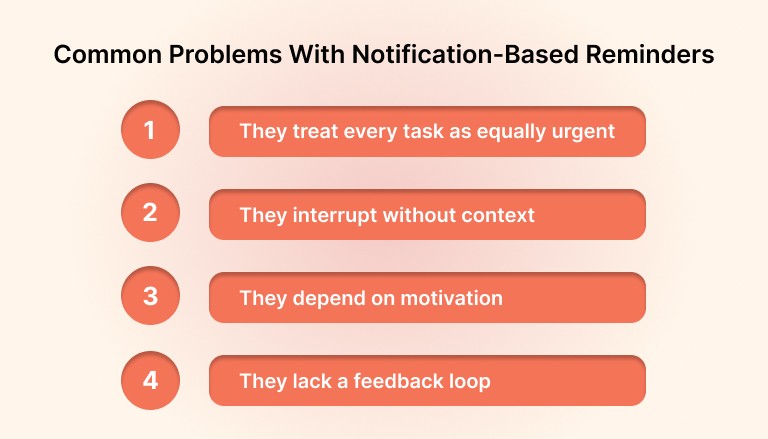
Here are some less obvious reasons daily reminders break down:
They treat every task as equally urgent
When your reminder app nudges you to “submit client invoice” right next to “drink more water,” your brain doesn’t register a difference. Over time, it becomes harder to separate what’s truly important from what’s just another to-do. This flattens your sense of priority and leads to decision fatigue.
They interrupt without context
Most reminders surface without understanding what you’re doing at that moment. A nudge to review your calendar while you’re mid-task pulls you out of focus and forces a context switch. Instead of supporting your workflow, it disrupts it. The result: you skip it and move on, which trains you to ignore future reminders too.
They rely on motivation instead of frictionless action
Tapping a notification isn’t the same as doing the task. Many reminders assume that simply prompting you is enough to trigger follow-through. But when the action requires effort, decision-making, or switching tools, most people defer it. The easier it is to dismiss a reminder without acting, the more likely it is to fail.
They lack a feedback loop
You get reminded, but what happens next? Traditional reminders rarely track completion, adjust based on behavior, or reinforce progress. Without a visible sense of progress or reward, there’s nothing anchoring the habit or motivating consistency.
The problem isn’t that we forget things. It’s that the tools we use to remember don’t respect how attention, behavior, and motivation actually work. To fix that, we need to rethink daily reminders as smart, context-aware prompts that fit into our day naturally.
Also read: Location-Based Reminders: Do They Really Boost Productivity?
Principles of Effective Daily Reminders
If reminders are going to be useful, they need to be designed around how real people think, work, and move through their day. Not just based on what needs doing, but how and when you’re most likely to follow through.
Here’s what sets effective reminders apart:
They are event-linked, not just time-based
Instead of setting reminders for arbitrary times, tie them to events in your routine. For example, “When I close my calendar, remind me to update tasks” works better than “At 4:00 p.m., update tasks.” Event-based reminders naturally fit your workflow and are easier to act on.
They support flow, not break it
A well-designed reminder shows up between moments of focus, not in the middle of them. That might mean surfacing during transitions, like after a meeting ends or when you open your task manager, instead of interrupting deep work. Timing isn’t just about the clock, it’s about attention.
They make the next step obvious
Effective reminders don’t just say “Do X.” They clarify how to start. For example:
Instead of “Plan your day,” use “Open your calendar and drag in top 3 tasks.”
Instead of “Follow up with clients,” say “Reply to the last 3 starred emails.”
A good reminder skips the decision-making and goes straight to the first action.
They adapt over time
Not every habit needs a reminder forever. Useful systems reduce prompts as the habit forms. If you still need a daily ping for something you’ve done 60 days in a row, that’s a red flag. Smart reminders should taper or adjust based on your behavior, not just repeat forever.
They group, rather than scatter
Instead of five separate pings throughout the day, batch your non-urgent reminders into a single check-in window. For example, a short end-of-day review with all pending reminders grouped makes it easier to respond and reduces context switching.
These principles work not just because they’re thoughtful, but because they respect your limited attention and build frictionless behavior into your actual day.
Alternatives to Traditional Reminders
Not every reminder needs to come from your phone. In fact, some of the most effective prompts are the ones you barely notice because they’re built into your environment, your tools, or your existing routines.
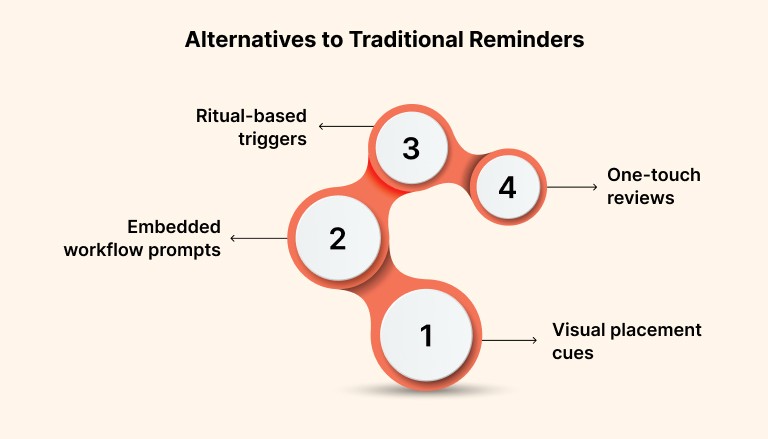
Here are a few approaches that replace constant notifications with more natural habit triggers:
Visual placement cues
Leave objects or tools in places where they naturally prompt the next action.
A notebook placed on your keyboard signals it’s time to plan.
A water bottle on your desk reminds you to hydrate without a ping.
Sticky notes or screensavers can double as subtle nudges for focus or reflection.
These reminders don’t interrupt, they exist in your line of sight and become part of your workspace.
Embedded workflow prompts
Rather than adding more reminders, use tools that integrate tasks into what you’re already doing.
A calendar that shows today’s top priorities at a glance
A task manager that opens automatically after a meeting
A workspace setup where your next step is always visible
When your systems are designed to surface the right task at the right moment, you don’t need separate reminders; your workflow becomes the reminder.
Ritual-based triggers
Turn common transitions into habit anchors.
Start your day with a 3-minute review before checking messages
Log tasks immediately after your last call
Reflect on wins while closing your laptop
These rituals create structure without alerts, helping habits stick through rhythm instead of repetition.
One-touch reviews
Instead of spreading reminders across the day, build a simple end-of-day or end-of-week check-in habit. One moment of reflection can replace a dozen scattered pings.
What didn’t get done today?
What needs to roll into tomorrow?
What should disappear from your list entirely?
This approach keeps you in control, avoids overwhelm, and builds momentum for the next day.
These alternatives don’t rely on dopamine-driven taps or interruptions. They work because they’re grounded in how you move through your space, your work, and your time.
Must read: Best Goal Tracking Apps in 2026: Tools That Fit the Way You Actually Work
Examples of Habit-Friendly Reminder Strategies
The best reminder is the one you don’t have to think about. It simply nudges the right action at the right time, without pulling you out of your day. Whether you’re building habits around work, wellbeing, or personal growth, the reminder should support the flow you already have, not disrupt it.
Here are real-world examples that show how this looks in action across different areas:
For Focused Work
Habit: Start deep work without distractions
Old approach: Reminder at 9:00 a.m. saying “Time for deep work”
Better strategy:
Trigger: When you open your calendar or close Slack
Cue: Calendar shows a time-blocked work session with a named task
Reinforcement: End session with a one-line note on what got done
Why it works: The trigger is tied to a real behavior (checking your calendar), not a random alert. There is no need to remember because your workflow handles it.
For Planning and Task Review
Habit: Review your tasks at the end of each day
Old approach: Daily pop-up reminder at 6:00 p.m.
Better strategy:
Trigger: When you finish your last call or close your laptop
Cue: Task app opens to “Today’s Tasks” view
Reinforcement: You clear or reschedule anything still pending
Why it works: This turns an existing end-of-day moment into a quick, frictionless planning habit without requiring an alert.
For Health and Wellness
Habit: Take regular stretch breaks
Old approach: Timer-based reminders every hour
Better strategy:
Trigger: After sending a batch of emails or wrapping a meeting
Cue: Desk setup includes a standing note or stretch prompt
Reinforcement: Track how often you stand or move using a visual counter
Why it works: The stretch happens at a natural stopping point, not in the middle of focused work, and it fits into the way your day is already structured.
For Learning or Reflection
Habit: Reflect for 2 minutes daily
Old approach: Journal app reminder at bedtime
Better strategy:
Trigger: As part of your wind-down routine (after closing your computer or brushing your teeth)
Cue: A question card or a short prompt left near your bedside
Reinforcement: Quick bullet-point reflection, optionally logged
Why it works: The physical cue makes it feel like part of the environment, not a task to be checked off.
The common thread: These habits succeed because the reminders are not just alerts. They are built into your day. They appear where they make sense, take minimal effort to act on, and create rhythm instead of relying on willpower.
How to Audit and Tune Your Reminder System
Even a well-designed reminder system needs maintenance. Habits evolve, priorities shift, and what worked a month ago might now be adding clutter. A quick audit can help you keep only the reminders that support your behavior, not distract from it.
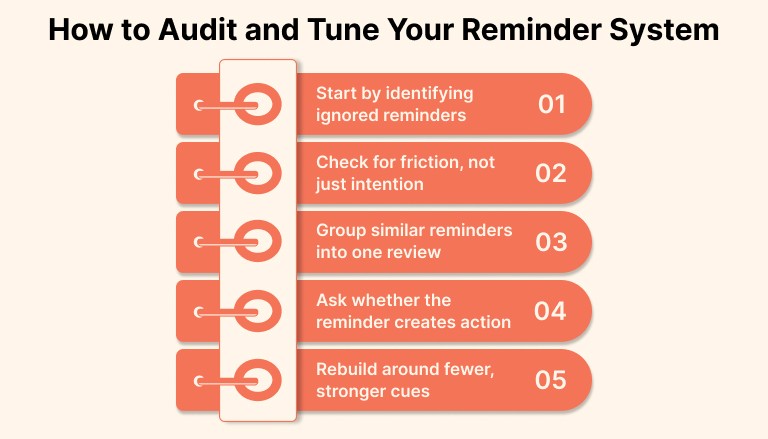
Here’s how to assess and improve your current reminder setup:
Start by identifying ignored reminders
Look at the past 7 to 10 days. Which reminders did you consistently skip, snooze, or overlook? These are likely:
Poorly timed
Misaligned with your real priorities
No longer relevant to your current workflow
If you’re not acting on a reminder regularly, it needs to be reworked or removed.
Check for friction, not just intention
Ask yourself what happens immediately after a reminder appears. Is the next step obvious, or does it require decisions, tool switching, or extra effort?
Examples of friction that stop follow-through:
“Update CRM” when you are not at your desk
“Workout” with no time blocked or preparation
“Plan your week” with no structure defined
Replace vague prompts with reminders that clearly point to a first action.
Group similar reminders into one review
If you have multiple reminders around planning, follow-ups, or reflection, combine them into a single review moment.
For example:
Clear inbox
Move unfinished tasks to tomorrow
Write down what worked today
Handled together, this becomes a short and meaningful wrap-up instead of a series of interruptions.
Ask whether the reminder creates action or pressure
Some reminders sound productive but only create guilt. If a reminder increases anxiety without leading to progress, it is not doing its job.
Replace “catch up on everything” with something concrete and finishable, like “clear one priority task” or “close two open loops.”
Rebuild around fewer, stronger cues
The goal is not more reminders. It is a better reminder. A small number of prompts that appear at the right moment and lead to clear action will always outperform dozens scattered across the day.
A strong reminder system is not something you set once and forget. It should evolve with your workload and priorities. Review it regularly, remove what no longer helps, and keep only what supports real follow-through.
How Akiflow Supports Smarter Reminders and Habit Planning
Most tools treat reminders as pop-ups. Akiflow treats them as part of your day structure. Instead of adding more alerts, it helps you build routines around time, attention, and actual follow-through.
Here’s how Akiflow helps high-performing professionals turn intentions into habits without constant nudging:
Turn tasks into time blocks, not just to-dos
With Akiflow, you don’t just list tasks. You drag them into your calendar and give them a home in your day. That shift from intention to scheduled action is one of the most reliable ways to make habits stick. No separate reminder needed. Your calendar becomes the cue.
Plan once, then focus
Start your day with a command center view that shows everything in one place, including tasks from tools like Notion, Slack, and Gmail. You can set your plan, block time, and move through the day without chasing reminders or switching tabs.
Build routines around your real schedule
Daily planning flows naturally with features like recurring tasks, preset time blocks, and shortcuts. Want to review tasks every day at 4 p.m.? Just block the time. No ping required. You show up because it’s part of your calendar, not because your phone buzzed again.
Prioritize what actually matters
Akiflow’s AI suggestions help you focus on what’s important, not just what’s urgent. You can sort, snooze, or reschedule tasks quickly. This keeps your reminders aligned with your goals and energy, not just deadlines.
Eliminate scattered alerts
Instead of relying on reminders from multiple apps, Akiflow centralizes everything into one place. You capture once, plan once, and work with clarity. No more fragmented notifications and no more mental clutter.
Smart reminders are not about more noise. They are about less friction. Akiflow helps you build daily structure around the way you actually work, with thoughtful planning instead of reactive alerts. Try now!
Final Thoughts
Most of us aren’t short on motivation. We’re just surrounded by too many pings, too many tabs, and too many systems trying to compete for our attention.
The right reminder doesn’t feel like a nudge. It feels like clarity. It shows up when you’re ready for it, fits into how you already work, and helps you take the next step without overthinking it.
That’s what Akiflow helps you build. Not a louder system, but a calmer one. One that helps you plan with intention and actually follow through.
Because the goal isn’t to get reminded. It’s to not need reminding at all.
FAQs
Q: How to put a daily reminder?
A: You can set a daily reminder using a calendar app, task manager, or voice assistant. Choose a time or trigger that fits your routine so the reminder feels natural, not disruptive.
Q: How to stop constant notification reminders?
A: Go into your app or phone settings and disable non-essential alerts. Replace frequent pings with scheduled check-ins or a single daily review to stay informed without constant interruptions.
Q: How do I stop alerting notifications?
A: Silence or turn off alerts for apps that don’t require immediate action. Use focus modes or Do Not Disturb to take back control of when and how you’re notified.
Q: What is the best daily reminder?
A: The best daily reminder is one that fits into your existing routine and prompts action without distracting you. It should feel like a helpful cue, not another thing to swipe away.
Q: How do I add reminders for every day?
A: Use your calendar or task app to create a recurring reminder. Make sure it aligns with something you already do, like after breakfast or before shutting down for the day.


