How to Improve Time Management Skills in 2025: 5 Strategies That Actually Work

11

Summary
Build a planning routine around your actual workday: capture tasks in one place, account for existing meetings, and review priorities as commitments change.
Turn priorities into calendar commitments: choose one non-negotiable task, pair it with time blocks that match your energy, and protect those focus windows from meetings.
Keep time management sustainable with a weekly review, a short daily reset, and a consistent way to say no before low-impact work takes over.
Time management remains one of the most common challenges across industries. According to one report, 82 percent of people don’t have a time management system in place. In another study nearly nine in ten workers admitted to wasting time at work, with 31 percent saying they lose at least 30 minutes a day to distractions. Meanwhile other findings reveal that employees lose up to 720 work hours per year due to distractions, which is nearly three full work weeks lost annually.
These figures illustrate a common truth: poor time management goes beyond inconvenience. It costs real hours, disrupts focus, and adds stress. If you are looking for practical strategies to take control of your time, this blog shows how simple habits and system‑level change can transform your workflow and reintroduce actual structure to your day.
Why Time Management Is Still So Hard in 2025
Time management advice is everywhere, yet it often feels impossible to follow through. That’s because most systems ignore the reality of how work shows up today.
Here are a few reasons it continues to feel difficult:
You are interrupted constantly: Notifications, chat pings, and emails break your focus before you get into real work
Your priorities change mid-day: Meetings get added, deadlines shift, and you end up reacting instead of executing
Your to-do list grows faster than it clears: Without a structure to sort and schedule, your list becomes a source of anxiety
More tools mean more tabs, not more clarity: Jumping between apps to find tasks, notes, or updates wastes time and drains attention
You think you need more time when you actually need more structure: Longer hours do not fix a disorganized workflow; they make the problem bigger
Time management only works when your system matches how your day actually works. Most people fail not because they are unmotivated, but because they are overloaded and under-supported by their current setup. The good news is that small adjustments to how you plan and protect your time can make a big difference.
Must read: Discover the Best Time Management Methods for a More Productive Day
What Effective Time Management Looks Like

Good time management is not about cramming more into your day. It is about building enough structure to protect what matters and create forward momentum. High performers are not chasing every task. They are choosing the right ones and knowing when to do them.
Here’s what that actually looks like in practice:
You know what to work on without overthinking: Your most important tasks are sorted and scheduled before distractions begin
Your calendar matches your priorities: Meetings do not crowd out deep work because focused blocks are protected in advance
You feel in control, even on busy days: When plans shift, your system adjusts without everything falling apart
You are not constantly checking tools: Everything lives in one clear workflow that shows tasks, time, and context in real time
You end the week knowing what moved forward: Instead of guessing what got done, you have visible progress and a sense of closure
If your current setup feels reactive or chaotic, it is not a motivation problem. It is likely a structure problem. The right system makes focus feel natural and planning feel like a support, not a second job. That is the shift professionals are aiming for in 2025.
5 Time Management Strategies That Actually Work in 2025

Most professionals do not lack effort. They lack systems that work with the way tasks and meetings actually show up. These five time habits are simple to apply and built to last.
1. Use Time Blocking to Own Your Calendar
Time blocking means planning your day by assigning specific hours to key tasks. This helps you stay intentional and prevents your calendar from filling up with everything but real work.
Why it works:
Turns priorities into visible time commitments
Reduces the pressure of open-ended to-do lists
Builds natural boundaries around focus work
Quick setup tip:
Block one hour in the morning and one in the afternoon for deep work
Treat those blocks as non-negotiable
Use a color-coded calendar to differentiate focus time from calls
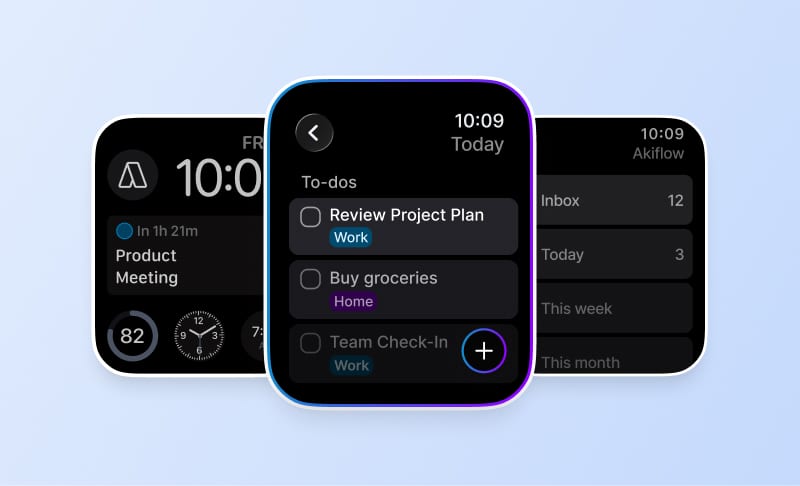
Pro tip: Tools like Akiflow let you turn any task into a time block instantly; right from your task inbox. This makes time blocking fast enough to stick, even on busy days.
2. Capture Tasks the Moment They Come In
Trying to remember every task wastes energy and guarantees things will slip. Capturing tasks immediately, no matter where they come from, keeps your head clear and your list reliable.
Why this works:
Frees up brainpower by offloading everything
Keeps small tasks from piling up
Reduces stress about forgetting
How to build the habit:
Use one central place for task capture
Keep it open while working so nothing gets missed
Review and sort once a day
Smart tip: With Akiflow, tasks from Slack, Gmail, and Notion land in one inbox—so you can capture without jumping between tabs or tools.
3. Set Clear Priorities Every Day
A long to-do list without order creates anxiety. Start each day by deciding what matters most and when it will happen.
How to do this:
Choose one non-negotiable task each morning
Sort the rest into categories: Deep Work, Admin, Quick Tasks
Pair tasks with time blocks that match your energy
Mini reset idea: Do a three-minute review each morning before checking email. It puts you in charge of the day instead of reacting to it.
4. Create a System for Saying No
Every yes takes time. Without a system to say no, your calendar fills up with meetings and tasks that dilute your focus.
Why this helps:
Builds space for real work
Reduces burnout and overcommitment
Makes boundaries feel easier, not rude
How to say no politely:
“I’m focused on deadlines this week but can revisit later”
“Let’s check in next week once my schedule clears”
Offer to delegate or share a resource if it helps
When you know your priorities, saying no becomes a time-saving decision, not an emotional one.
5. Review and Adjust Weekly
Weekly reviews are how time management becomes sustainable. They help you course-correct before things fall behind.
What to review:
What moved forward and why
What slipped and what caused it
How your time matched your goals
Try this framework:
Keep: Tasks or habits that helped
Cut: Time-wasters or distractions
Change: What you want to do differently next week
Your calendar shows what you did. Your review helps decide what you want to do next. Professionals who pause weekly to reset are consistently more in control of their time.
Also read: 10 Strategies for Mastering Time Management
Time Management Tips for Professionals and Students
Different roles come with different time challenges. The structure that helps a consultant stay on top of projects will look different from what helps a student stay focused during midterms. Still, the goal is the same: use time with intention, not stress.
For Busy Professionals

Work rarely arrives in a tidy sequence. Managing shifting priorities and constant context switches requires more than a to-do list.
Here are a few strategies that make time easier to control:
Sync your task list with your calendar so planning becomes visible
Block time based on energy, not just availability
Choose one primary focus per day to reduce decision fatigue
Use tools like Akiflow that centralize inputs from apps like Slack, Notion, and Gmail
End each day with a short reset to clear mental tabs and prep for tomorrow
Professionals who work across tools and teams benefit most from integrated systems. Akiflow helps by pulling scattered tasks into one place, allowing you to schedule work with just a few clicks and avoid overload before it starts.
For Students

Studying is not just about putting in hours. It is about managing attention, setting pace, and creating habits that make progress feel consistent.
Time tips that support better learning:
Batch similar subjects or assignments to reduce switching costs
Use digital calendars with alerts to prep ahead of time
Build in real breaks to reset focus and avoid burnout
Keep your workspace and screen free of unrelated tabs
Review weekly assignments every Sunday to avoid last-minute stress
One strong tactic for students is pairing time blocks with types of tasks, like readings in the morning or problem sets in the afternoon. When focus is matched with routine, results tend to follow.
Whether you are managing client calls or final exams, time is not just something to track. It is something to shape. And the more your system fits your reality, the better it works.
Popular read: Top Time Management Tools to Stay Focused and Get More Done
Best Tools to Build and Improve Time Management Skills
Getting better at time management is not just about having a to-do list. It is about having a system that supports consistent planning, clear priorities, and ongoing reflection. The right tool helps you build skills, not just check boxes.
Here’s how a few top tools support real habit change:
Akiflow
Akiflow connects task capture, calendar scheduling, and daily reviews into one streamlined workflow
What makes it powerful for skill building:
Tasks flow in from email, Slack, Notion, and other tools without manual entry
You can instantly turn any task into a calendar block
Daily review mode makes it easy to reset priorities and reflect on progress
One interface shows what to do, when to do it, and how it fits with everything else
For professionals who want clarity and control without jumping between apps, Akiflow builds structure into your routine so focus becomes a habit
Todoist
Todoist is a task manager known for simplicity and speed
Where it helps:
Great for capturing and organizing personal or team tasks
Built-in priority labels and filters help with daily focus
Lacks calendar integration, which means planning happens in a separate space
While Todoist is effective for managing lists, it may need to be paired with other tools for full workflow visibility
Google Calendar
Google Calendar is familiar and widely used for scheduling
What it supports:
Easy to block time and share availability
Can connect to other apps, but does not manage task-level details
Ideal for planning events or meetings, less helpful for daily task execution
Best used when paired with a task management tool for end-to-end time control
When building better time habits, the tool matters less than how well it supports your actual day. Look for systems that encourage planning, make reviews easy, and fit naturally into how your work shows up. That is what creates lasting time control.
Looking for Best Task Management Tools and Techniques for 2025? Click here!
Most Common Time Management Mistakes

Even with the right tools and habits, it is easy to fall into patterns that quietly drain your time and energy. These are the most common missteps professionals make when trying to get more done.
Treating Every Task Like It Has Equal Weight
Trying to tackle a dozen small tasks before focusing on what actually matters
Saying yes to low-impact work that adds clutter to your day
Mistaking activity for progress
Planning Without Looking at Your Calendar
Making ambitious to-do lists that do not account for existing meetings
Overcommitting because there is no visual of your real capacity
Forgetting to buffer time between tasks, leading to mental fatigue
Letting Notifications Drive Your Day
Checking email or Slack the moment it pings instead of on your schedule
Losing time to reactive work instead of proactive priorities
Starting the day in inboxes instead of reviewing your goals
Skipping the Daily Reset
Ending the day with a vague sense of unfinished work
Carrying over loose tasks without reflection
Not reviewing what worked or what needs adjusting for tomorrow
Jumping Between Too Many Tools
Using separate tools for notes, tasks, and scheduling with no connection
Spending more time organizing work than doing it
Creating blind spots by managing priorities in different places
Small mistakes compound quickly when left unchecked. Time management improves most when you review how your system feels, not just how it looks. A good tool or habit should reduce friction, not add complexity. When in doubt, simplify and return to what actually helps you focus.
Ready to Take Control of Your Time?
If your day still feels scattered even after trying different techniques, it is time to move beyond disconnected tools and rigid systems. Akiflow brings everything together in one place so your planning finally matches the pace of your work.
With Akiflow you can:
Capture tasks instantly from tools like Gmail, Slack, Notion, and more
Turn tasks into time blocks on your calendar with one click
Review your priorities and schedule without jumping between apps
See exactly what needs attention without feeling overwhelmed
Professionals using Akiflow are not just managing time. They are shaping it. By combining task clarity with calendar-based planning, Akiflow helps you build habits that stick and workflows that scale.
Try Akiflow and give your focus the structure it deserves.
Final Thoughts
Good time management is not about doing more. It is about doing what matters with clarity and calm.
If your day still feels scattered, you do not need more effort. You need a better system.
Akiflow helps you turn tasks into time and plans into progress. Try it today and build a workflow that actually works.
Frequently Asked Questions
What is the first time-management reset to do tomorrow morning?
Before you open email, do a three-minute review. Pick one priority task, sort the rest into Deep Work, Admin, and Quick Tasks, then assign focused work to your calendar. The article suggests an hour in the morning and afternoon as a starting example; account for existing meetings and leave buffer time between tasks.
How is time blocking different from just keeping a to-do list?
A to-do list records what needs doing. Time blocking adds when you intend to work on it. Put key tasks into specific calendar slots alongside existing meetings, making priorities visible as time commitments. Review those reservations when plans change rather than assuming a calendar block guarantees uninterrupted work.
How can you capture tasks without building a complicated system?
Keep one central capture place open while you work and add tasks as they arrive, rather than relying only on memory. Then review and sort that inbox once a day. Use the review to choose priorities and decide when to work on them, connecting your task list with your calendar.
When should you say no, and what can you say instead?
Say no when a request cuts into your real priorities or fills time reserved for focused work. You do not need a harsh rejection. Try, “I’m focused on deadlines this week but can revisit later” or “Let’s check in next week once my schedule clears,” then delegate or share a resource when that makes sense.
What should you look for in a time-management setup?
Look for a setup that supports task capture, calendar planning and regular reviews in the way you actually work. Check whether it makes priorities and available time clear. If separate tools leave tasks, notes and schedules disconnected, simplify the workflow rather than spending more time organizing work than doing it.