Summary
Use one central planner to collect tasks, identify daily priorities, and connect the work you intend to do with available calendar time.
Keep planning flexible: move tasks when urgent work arrives, and use a weekly review to examine unfinished work and adjust your approach.
A planner goes beyond collecting a to-do list by connecting tasks to priorities, goals, and time; paper and digital formats serve different preferences.
Introduction
No matter how hard you work, it often feels like there aren’t enough hours in the day. Emails pile up, meetings eat into focus time, and scattered to-do lists leave you wondering if you’re really making progress toward your goals. You’re not alone.
A research report found that employees spend 28% of their week just managing emails.
The truth is, productivity isn’t about adding more to your plate. It’s about simplifying how you manage your time and energy. That’s where a simple productivity planner comes in.
By giving structure to your day, cutting through noise, and aligning tasks with priorities, you can work with clarity and reach your goals without burning out.
Why Productivity Feels So Hard Today?

Most professionals aren’t struggling because they’re lazy. It’s because the modern workplace is designed to fragment attention. Even the most motivated teams get stuck in cycles of busyness without progress.
Here are the most significant reasons:
Task overload: Between emails, Slack pings, project tools, and personal notes, tasks pile up from every direction. Without a single view, it’s easy to feel like you’re drowning in to-dos.
Lack of structure: Many people start the day reacting to what’s urgent instead of working on what’s important. Without a clear plan, priorities slip through the cracks.
Constant interruptions: Research shows the average worker is interrupted every 6–12 minutes, and it takes over 20 minutes to regain complete focus. That makes deep work nearly impossible.
Meeting fatigue: Too many back-to-back meetings leave little room for actual execution. A Microsoft survey revealed that 62% of calls and meetings are unplanned, often clashing with focused work time.
Missed goals: When urgent requests consume your energy, there’s little time left for long-term projects or personal goals. Over time, this creates frustration and burnout.
The result? Days feel busy but not productive. This is a clear signal that what’s missing isn’t effort, but a system to manage it all.
These obstacles highlight the need for a better system, i.e., something that simplifies your workflow instead of adding to the chaos. That’s where a simple productivity planner makes the difference.
Must Read: 10 Tips for Becoming a Better Planner - Akiflow
What Makes a Productivity Planner “Simple”?
The most effective productivity planners aren’t the ones packed with endless features or complicated frameworks. A planner should feel like a support system, not another chore on your list.
Here’s what makes a planner truly simple and powerful:
Easy to use every day: You shouldn’t need a manual or hours of setup. A simple planner is intuitive enough to slot into your workflow instantly.
Centralises your tasks: Instead of jumping between emails, Slack, Notion, and sticky notes, everything should live in one place so you can focus on execution, not collection.
Clear priorities at a glance: A good planner helps you instantly spot what matters most, cutting through the noise of low-value tasks.
Supports time-blocking: Simplicity doesn’t mean rigidity. The best planners help you block time for deep work, while still leaving room for flexibility when things shift.
Lightweight but adaptable: Life and work aren’t predictable. A simple planner should make it easy to move tasks around without disrupting your whole system.
When done right, a simple planner gives you confidence in your day. You know where to focus, how to manage interruptions, and how today’s actions connect back to your long-term goals.
Knowing what to look for in a planner is only the first step. The real impact comes when you put it into practice with a clear, repeatable process.
Must Read: Task Switching and Multitasking - Akiflow
Steps to Create Your Simple Productivity Planner

A productivity planner works best when it’s practical and easy to use. Instead of overcomplicating the system, focus on these five simple steps:
1. Collect All Your Tasks in One Place
Why it matters: Scattered tasks are the biggest source of stress. If your to-dos are spread across email, chat apps, project tools, and sticky notes, it’s impossible to get a clear picture.
How to do it: Choose one central space for all your tasks, whether that’s a digital planner, a single app, or even a notebook. Make it your “source of truth” so you’re never chasing tasks across platforms.
2. Define Clear Priorities
Why it matters: Not all tasks deserve equal attention. Without prioritisation, urgent but low-value work eats into time meant for meaningful goals.
How to do it: Start each day by identifying your “Top 3” tasks, the ones that will create the most impact if completed. This keeps you focused even when your list is long.
3. Block Time for Focus
Why it matters: Research shows that context-switching can cost up to 40% of your productivity. Protecting blocks of uninterrupted time is essential for deep work.
How to do it: Use your calendar or planner to assign specific time slots to high-priority tasks. Treat these blocks like meetings, with yourself, and protect them from distractions.
4. Stay Flexible with Changes
Why it matters: No day goes exactly as planned. A rigid planner quickly becomes frustrating, and people abandon it.
How to do it: Keep your system light and easy to adjust. If something urgent comes up, move tasks to a later slot or reschedule them without guilt. Flexibility is what makes a planner sustainable.
5. Review Progress Weekly
Why it matters: Without reflection, it’s hard to see where your time really goes or why tasks slip. Weekly reviews help you refine your system and build momentum.
How to do it: At the end of each week, spend 10–15 minutes checking what got done, what slipped, and why. Use these insights to plan better for the week ahead.
Following these five steps transforms your planner into a simple but powerful tool. Instead of reacting to whatever comes your way, you take control of your time with clarity and confidence.
Once you’ve built this system, the benefits go far beyond staying organised—they directly shape how effectively you move toward your goals.
Must Read: How to Manage Work and Personal Calendars - Akiflow
How a Simple Productivity Planner Helps You Achieve Goals?
A simple productivity planner does more than keep track of tasks. It shifts the way you work. Instead of reacting to the day as it unfolds, you move forward with intention and clarity.
Here’s how it supports real progress:
Keeps you proactive, not reactive: By mapping out priorities ahead of time, you spend less energy fighting distractions and more energy moving toward meaningful outcomes.
Builds consistency in daily habits: Small, structured steps each day accumulate into steady progress on long-term goals.
Prevents burnout: A planner helps balance workload by showing exactly how much fits into a day, reducing the stress of overcommitment.
Aligns actions with bigger objectives: Breaking goals into manageable steps ensures that important projects don’t get buried under urgent but less valuable tasks.
Provides clarity and confidence: At the end of each day, you can see what’s been accomplished and what’s next, removing the guesswork and mental clutter.
While a generic planner sets the foundation, the right tool can take your planning to the next level by integrating tasks, time, and focus in one place. That’s where Akiflow comes in.
How can Akiflow Help with Productivity Planning?

While traditional planners give you structure, they often fall short when your work is spread across multiple tools and constant changes. That’s where Akiflow makes the difference. It combines the simplicity of a planner with the power of automation and integrations:
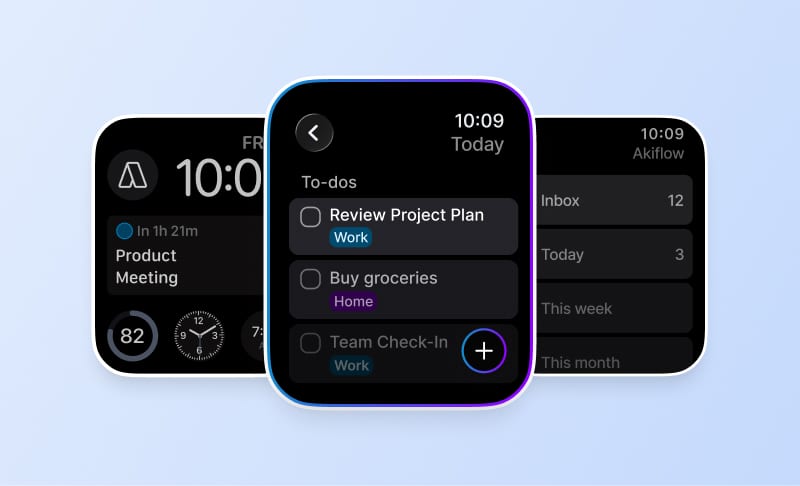
All tasks in one place: Akiflow pulls tasks from email, Slack, Asana, Notion, and other apps into a single dashboard. You no longer waste time chasing updates across platforms.
Built-in time blocking: Instead of juggling a separate planner and calendar, you can schedule tasks directly into your calendar. This ensures deep work time is protected and meeting clashes are avoided.
Quick capture and rescheduling: Capture new tasks instantly with a keyboard shortcut and move them around with drag-and-drop. Even when priorities shift, your planner adapts in seconds.
Focus without distractions: With notifications managed and tasks clearly scheduled, you can work without constant context switching.
Must Read: 10 Best Scheduling Time Management Methods for Getting Things Done - Akiflow
Conclusion
Staying productive in today’s fast-paced work environment is about doing what matters most with clarity and focus. A simple productivity planner helps you cut through noise, stay organised, and steadily move toward your goals without burning out. By centralizing tasks, protecting time for deep work, and keeping priorities clear, you can shift from feeling busy to feeling truly accomplished.
If you’re ready to simplify your planning and take back control of your time, try Akiflow. It brings all your tasks and calendar into one place, making productivity planning effortless and effective.
Start your journey with Akiflow today and turn your goals into daily progress. Book a free demo now!
Frequently Asked Questions
How is a productivity planner different from a to-do list?
A to-do list captures what needs doing. A productivity planner also connects those tasks to priorities, goals, and time. You identify the work that matters most and assign space for it in your calendar, rather than stopping once you have collected a list of tasks.
What should I put in my planner first?
Start by choosing one central place for your tasks, whether that is a notebook or a digital planner. Then identify your top three tasks for the day: the ones that would have the greatest impact if completed. Give those priorities specific time slots in your calendar or planner.
How should I handle an urgent task that changes my plan?
Keep the plan easy to adjust. When urgent work arrives, move affected tasks to a later slot or reschedule them. A plan can change during the day; the weekly review then gives you a chance to examine what slipped and why, instead of treating the original schedule as fixed.
What should I check during a weekly planner review?
At the end of the week, spend ten to fifteen minutes checking what you completed, what slipped, and why. Use those observations to plan the following week. The review focuses on differences between the plan and actual progress, so the next plan reflects what happened.
Should I use a paper planner or a digital one?
Choose according to your preferences. Paper offers a simple, minimal format, while digital planning offers flexibility and easier rescheduling. Either way, keep your tasks in one central place and connect your most important work to time slots. The planning process matters beyond the format you use to hold it.