

Startups move fast, often with limited time, people, and resources. The global market for task and collaboration tools is projected to hit $5.14 billion in 2025, driven in large part by early-stage teams seeking smarter ways to stay on top of work.
But spending more on software doesn’t always mean teams are working smarter. A 2025 report from MyHours found that professionals working remotely get an average of 22.75 hours of deep-focus time per week, while in-office workers average 18.6 hours. Despite better tools, the struggle to find uninterrupted time and manage tasks clearly is still very real.
In a startup, the cost of disorganized work is higher. Missed deadlines, repeated efforts, and unclear ownership slow down the whole team. And when everything feels urgent, it’s hard to stay focused on what actually matters.
Lean task management gives startups the clarity to prioritize, the structure to execute, and the space to think ahead. Without it, you’re not just losing time, you’re losing momentum.
Key Takeaways
Startups face unique task management challenges due to limited time, rapid growth, and scattered tools. Without structure, the cost is lost time and momentum.
The global demand for task tools is growing fast, but more software doesn’t mean more clarity. What matters is using the right system in the right way.
The ideal task tool for startups is lean, fast to set up, and flexible enough to scale. Look for features like quick task capture, calendar integration, and support for team collaboration.
Popular tools like Trello, Asana, ClickUp, and Notion offer different strengths depending on your team size, work style, and level of complexity.
Founders and remote professionals benefit from time-blocking tools that bring tasks and calendars into one place. A platform like Akiflow supports this deep work approach without adding noise.
Your tool should match your stage. Solo founders need simplicity. Growing teams need visibility. Scaling teams need cross-functional flexibility.
Habits are just as important as tools. Weekly planning, defining clear outcomes, time-blocking, and regular reviews keep your system working.
Common mistakes to avoid include tool overload, skipping scheduling, and unclear ownership. A few small fixes can prevent wasted time and confusion.
The best approach is to unify tasks and time in one system. This gives your team clarity, helps protect focus, and creates space for meaningful progress.
Top Features to Look for in a Startup Task Management Tool
Choosing a task management tool isn’t about having the most features. It’s about finding one that fits your team’s pace and mindset. Startup teams don’t have the luxury of long onboarding or rigid systems. The right tool helps you move faster without adding complexity.
Here’s what to look for:
Fast task capture from anywhere: Tasks come in through Slack, emails, quick calls, and passing conversations. You need to log them instantly without losing context.
Flexible structure without friction: You shouldn’t need to create nested folders or multi-step workflows. It should be easy to track what’s in progress, what’s blocked, and what’s next.
Calendar connection: If a task isn’t scheduled, it often doesn’t get done. A tool that lets you schedule tasks directly into your calendar bridges the gap between planning and execution.
Simple collaboration: Assigning tasks, updating status, or leaving quick notes should support the work, not create more of it.
Syncs with tools you already use: Your team is already in Gmail, Notion, or Asana. Your task system should pull it all together, not create another silo.
Grows with your team: As your startup scales, visibility becomes key. You should be able to see who’s doing what without chasing updates or running extra standups.
The best tools don’t slow you down. They fit quietly into your workflow, helping your team stay focused and get more of the right things done.
Must read: Best Task Management Tools and Techniques for 2026
Best Task Management Tools for Startups in 2026
There’s no shortage of task management apps, but most startups don’t need an enterprise-level solution. What they need is something lean, fast to adopt, and flexible enough to grow with them.
Here are a few tools that consistently show up in fast-moving teams:
Trello
Best for: Early-stage teams and visual planning
Trello uses a simple board-and-card layout that’s easy to understand at a glance. It’s ideal for startups looking to get organized quickly without overhauling their workflow. You can create boards for product sprints, marketing pipelines, or investor outreach and move tasks across stages with a simple drag.
What works:
Low learning curve
Easy for cross-functional collaboration
Good for teams just getting started with project tracking
Asana
Best for: Teams juggling multiple priorities and cross-team handoffs
Asana helps teams stay aligned on timelines, responsibilities, and goals. You can assign tasks, set due dates, and use features like dependencies to avoid bottlenecks.
What works:
Clear task ownership
Timeline view for planning ahead
Good balance between simplicity and depth
ClickUp
Best for: Teams that want one workspace for everything
ClickUp combines docs, tasks, goals, and dashboards. It offers multiple views (list, board, Gantt, calendar) and deep customization options for teams that want a single source of truth.
What works:
Highly customizable setup
Built-in goal tracking and dashboards
Suitable for slightly more complex workflows
Notion
Best for: Teams who like building their own systems
Notion blends docs and databases, which makes it powerful for teams who want a more fluid, modular workspace. Task tracking isn’t the core function, but it can work well for teams already using Notion as a knowledge base.
What works:
Custom workflows with templates
Ideal for connecting task management with wikis and docs
Better suited for smaller teams or internal use
A tool for time blocking and centralizing tasks
Best for: Founders, remote workers, and professionals who need to protect deep work
Some tools go beyond lists and boards by helping you manage your time, not just your tasks. Look for platforms that let you pull in tasks from email, Slack, and project tools, and then schedule them into your calendar.
This approach works especially well for solo founders or distributed teams who need to reduce distractions and focus on actual output, not just task tracking.
A productivity platform like Akiflow fits this need well. It brings all your tasks into one command center and helps you schedule focused work directly into your calendar so you’re not just planning your tasks, you’re making time to finish them.
This approach keeps task management lean by reducing planning overhead while increasing follow-through.
Must read: Time Blocking and Task Management
How to Choose the Right Task Tool for Your Startup Stage
Even the best task tool will fall short if it doesn’t match the way your team works. What a solo founder needs is very different from what a 15-person cross-functional team needs. Instead of asking “What’s the best app?”, focus on what makes sense for your current stage.
If you’re a solo founder or small team (1 to 5 people):
Simplicity wins. Look for tools that are fast to set up, easy to maintain, and support both task capture and scheduling. At this stage, your time is your most valuable asset. The tool should help you plan your day and protect focus time without getting in your way.
What matters:
Fast setup and zero onboarding friction
Calendar-based planning to reduce overload
Clear personal priorities at a glance
If you’re growing a team (5 to 15 people):
Collaboration starts to matter more. You need visibility into who’s doing what, when it’s due, and what’s getting blocked. Your tool should support lightweight team workflows without becoming a project management suite that requires full-time management.
What matters:
Assignable tasks and shared project views
Real-time updates and status tracking
Ability to sync with communication tools like Slack or Gmail
If you’re scaling and hiring across functions:
Your task system should now act as a shared source of truth. Different departments will need different views. Your marketing team might prefer a Kanban board, while your dev team may need tasks tied to deadlines. Flexibility is key, but so is structure.
What matters:
Multiple view types such as board, list, and timeline
Permission settings and team-specific spaces
Easy integration with planning, CRM, and documentation tools
Choosing based on where you are, not just where you’re headed, helps avoid the trap of overbuilding too early. Look for tools that can adapt over time but don’t add unnecessary complexity today. The right choice should free up energy, not drain it.
Lean Task Management Habits That Help Startups Scale Faster
Even the best tool falls flat without the right habits behind it. Startups that scale well tend to build simple, repeatable systems around how they manage work. It’s less about mastering a tool and more about using it consistently.
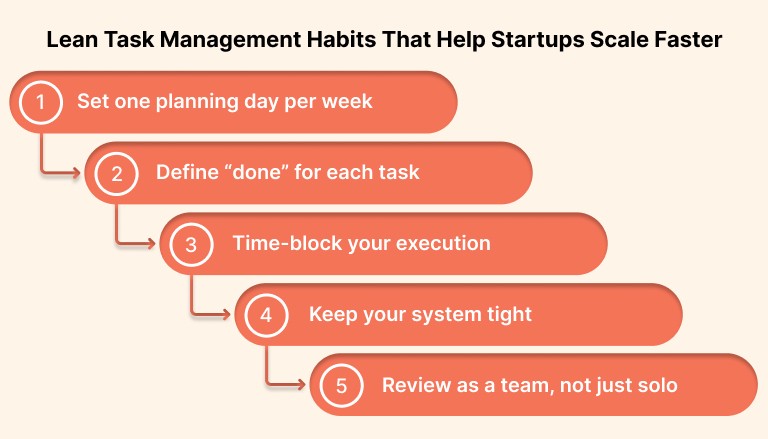
Here are a few habits that help make your task setup actually work:
Set one planning day per week
Pick one day, usually Monday or Friday, to review what’s on your plate. Prioritize a handful of key outcomes for the week and schedule them directly into your calendar. This avoids starting each day from scratch.
Define “done” for each task
Vague tasks like “update homepage” or “prep report” lead to confusion and rework. Use your tool to include a short checklist or note on what completion looks like. This helps reduce handoff friction and speeds up reviews.
Time-block your execution
Tasks are only half the equation. If you don’t carve out time to actually work on them, they pile up. Use your calendar to block time for the most important work of the day. This is especially useful for founders and team leads who are juggling both strategy and execution.
Keep your system tight
Don’t let your task tool become a dumping ground. Archive what’s done. Delete what’s outdated. Use a short daily or weekly cleanup session to keep your workspace usable and relevant.
Review as a team, not just solo
Whether it’s a weekly sync or a quick async update, create a shared ritual where the team can check in on what’s moving forward and what’s stuck. This builds accountability without micromanagement.
Tools help you stay organized. Habits help you stay consistent. When you pair the two, task management becomes a system you can rely on; even during chaotic weeks.
Trending read: Boost Your Productivity with a Smart Weekly Task List
Common Task Management Mistakes to Avoid in Startup Teams
Getting organized is only half the battle. The other half is avoiding the pitfalls that quietly slow your team down. Even the best task tools can’t help if the system around them breaks.
Here are some common missteps startups make, and what to do instead:
Letting every tool become a to-do list
It’s easy to end up with tasks scattered across Slack, Notion, email, and docs. This creates confusion over what’s actually been assigned, what’s urgent, and what’s already done.
Fix it: Choose one central place for capturing and scheduling tasks. Let other tools feed into it, not replace it.
Skipping the scheduling step
Adding a task to a list doesn’t make it real. If it’s not linked to time on your calendar, it usually sits unfinished. This is where most bottlenecks begin.
Fix it: Make time-blocking part of your weekly routine. Treat task planning and scheduling as the same process, not two separate steps.
Using too much structure too soon
It’s tempting to build out folders, tags, labels, templates, and custom views from day one. But complex systems often collapse under the weight of early-stage chaos.
Fix it: Start with just the essentials. As your needs grow, add layers; but only when they solve a real problem.
Reviewing work reactively, not proactively
Some teams wait until things fall behind to check progress. Without a consistent review rhythm, issues stay hidden until they cause delays.
Fix it: Set up a simple weekly review or async check-in. Keep it short and focused on what’s moving, what’s blocked, and what needs input.
Assuming the team will self-manage without clarity
Even in highly motivated teams, task ownership can get murky without clear assignments or deadlines. This leads to duplicate work or things slipping through the cracks.
Fix it: Make ownership visible. Assign tasks, add due dates, and keep priorities front and center.
Avoiding these mistakes doesn’t require a new tool. It just takes a tighter system and a little more intention around how your team works together. Start small, fix what’s broken, and give your tools the structure they need to support you.
Final Thoughts
Most startups don’t suffer from a lack of effort. They suffer from scattered effort.
You already have tasks coming in from Slack, email, Notion, and project boards. The challenge is turning that chaos into a single, workable plan. The most effective startup teams aren’t just working hard. They’re working with clarity. That means fewer dropped tasks, fewer calendar conflicts, and more space for deep focus.
If you’re not ready to overhaul your process, try this instead:
Centralize all your incoming tasks in one place
Block time on your calendar to work on the most important ones
Protect a few hours each week for strategy or deep work
Use one tool that supports this flow instead of stitching together five
A platform like Akiflow is built for this kind of workflow. It helps you capture, schedule, and actually finish what matters without bouncing between apps or managing complexity you don’t need. Try for free!
Your team doesn’t need more hustle. It needs a smarter, simpler system that can grow with you.
FAQs
Q: What is a startup task manager?
A: A startup task manager is a tool or system that helps early-stage teams organize, prioritize, and track their work. It’s designed to support fast-paced workflows without adding unnecessary complexity.
Q: What is the best tool for task management?
A: The best tool depends on your team’s size and workflow. For solo founders or remote teams, tools like Akiflow offer time blocking and task centralization. For growing teams, Asana, Trello, or ClickUp are also popular choices.
Q: What is a task management system?
A: A task management system is a structured way to capture, organize, assign, and complete tasks. It helps individuals and teams stay focused, reduce bottlenecks, and move work forward with clarity.
Q: Which tool is commonly used for project management in startups?
A: Startups often use tools like Trello for visual planning, Asana for structured workflows, or Notion for flexible, doc-based systems. The right choice depends on how your team communicates and executes work.


