Akiflow vs Twos: Quick Capture or Calendar Planning

3
Reviewed October 17, 2026. Published by Akiflow. This is an editorial comparison based on the official sources linked below, not an independent hands-on benchmark.
Summary
Twos brings notes, to-dos, reminders and events into a lightweight capture workflow. Akiflow emphasizes giving actionable commitments a place in the calendar.
Apple Watch and iCloud comparison
Feature | Akiflow | Twos |
|---|---|---|
Apple Watch | Native capture and completion | Watch capture listed |
iCloud Calendar | Direct two-way event connection | Apple Calendar sync listed |
Twos explicitly lists Apple Watch capture and synchronization with Apple calendars on its current site. Both products therefore offer Apple-oriented workflows. Test how a changed appointment and a captured task move through each system; do not choose on the incorrect premise that Twos lacks Apple support.
Reviewed October 17, 2026. Native Watch apps, mirrored notifications, task-data sync and calendar subscriptions are different capabilities. Unconfirmed means the reviewed sources do not establish support, not that the feature is necessarily unavailable.
Official evidence: Twos source 1. Akiflow Watch documentation; Akiflow iCloud documentation.
What Twos actually offers
Twos describes a Today view, unfinished-item rollover, search and capture across several channels. Its current site explicitly lists Apple Watch and AI connections, including MCP. Do not claim those capabilities are exclusive to Akiflow.
Source: Twos official product information.
Where Akiflow fits
Akiflow brings tasks and calendars into a personal planning workflow. Its useful role is to make the relationship between commitments and available time visible: collect actionable work, choose what matters, and reserve time around existing events. It is not a substitute for every specialized workflow in another product.
A practical decision scenario
Capture an idea, a shopping item and a client commitment. The idea may only need retrieval later; the client commitment needs a next action and enough time. Test whether your chosen tool preserves that distinction without making capture cumbersome.
Trade-offs to consider
Automatic rollover keeps unfinished work visible but does not resolve overload by itself. Compare how you select what to do, what to defer and what to discard, rather than rewarding a tool for endlessly carrying items forward.
iCloud Calendar and Apple Watch in Akiflow
Akiflow now connects directly to iCloud Calendar. Event changes can sync in both directions, subject to calendar permissions. Scheduling a task does not automatically export it as an event: use Lock to publish a task or Time Slot to an editable calendar. Updates are periodic rather than a promise of instant synchronization.
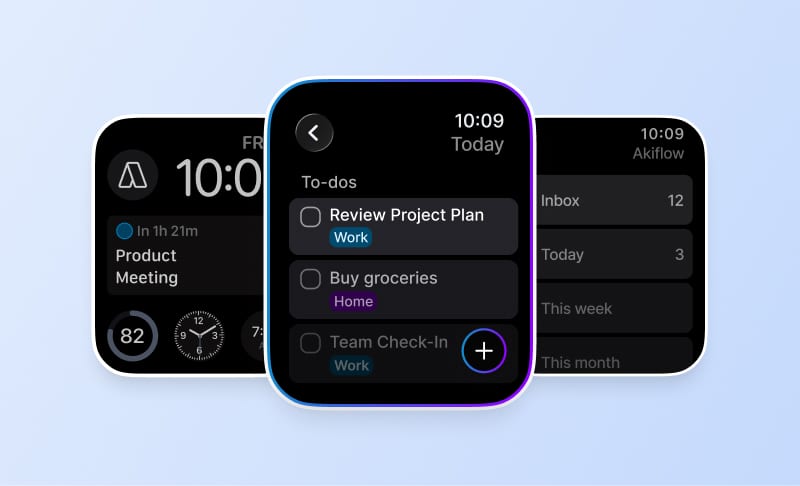
The Apple Watch companion supports task capture by text or dictation, completion and reopening, and checking what is current or next. It requires watchOS 10 or later and a paired iPhone running Akiflow 2.83 or later. Use the main app for editing, rescheduling or deleting tasks. The Watch does not provide Aki or natural-language scheduling.
Read the iCloud setup guide and Apple Watch guide for the supported workflow and its limits. The fall product update also explains Travel Time and the desktop redesign. These are Akiflow capabilities, not claims that the other product lacks every equivalent feature.
Before switching
Test with a real calendar account and a small set of non-sensitive tasks before moving your whole workflow. Include a changed appointment, an unfinished task and a new commitment. Check what synchronizes, what stays local and which system owns completion. A short successful demo does not establish reliability for every account or device.
Confirm the current plan, device support and billing terms on the official product site and Akiflow pricing page. Features may be plan-specific; this article does not reuse unverified historical prices or review scores.
FAQ
How do Twos and Akiflow compare for Apple devices?
Twos explicitly lists Apple Watch capture and synchronization with Apple calendars on its current site. Both products therefore offer Apple-oriented workflows. Test how a changed appointment and a captured task move through each system; do not choose on the incorrect premise that Twos lacks Apple support.
When should I choose Akiflow rather than Twos?
Twos brings notes, to-dos, reminders and events into a lightweight capture workflow. Akiflow emphasizes giving actionable commitments a place in the calendar.
Does connecting iCloud Calendar also import Apple Reminders?
No. The Akiflow connection is for calendar events. It does not import Apple Reminders, Apple Mail or calendars stored only on a device.
Can I manage the whole schedule from Akiflow on Apple Watch?
No. Use it for quick capture, completion and checking what is next. Editing tasks and reorganizing the schedule remain main-app workflows.