Akiflow vs Apple Reminders: Apple-Native Checklists or Connected Planning?

4

Summary
Apple Reminders can suit personal checklists; evaluate Akiflow when commitments originate in work systems and need reserved time alongside several calendars.
Scheduled reminders can appear in Apple Calendar, but connecting iCloud Calendar to Akiflow does not import the separate Apple Reminders service.
Distinguish reminder-only items from work needing a duration, then check whether that work receives protected time before adding another application.
Reviewed October 17, 2026. Published by Akiflow. This comparison is based on the official documentation linked below, not a hands-on benchmark or an independent review.
Apple Watch and iCloud comparison
Feature | Akiflow | Apple Reminders |
|---|---|---|
Apple Watch | Native capture and completion | Native Apple app |
iCloud Calendar | Direct two-way event connection | Reminders, not iCloud event sync |
Apple’s Watch ecosystem supports reminders and scheduled-reminder visibility in Calendar. Akiflow also has a Watch companion, but its supported actions and account data are different. Scheduled reminders can appear in Apple Calendar. Akiflow’s iCloud integration concerns calendar events; it is not an Apple Reminders synchronization feature.
Reviewed October 17, 2026. Native Watch apps, mirrored notifications, task-data sync and calendar subscriptions are different capabilities. Unconfirmed means the reviewed sources do not establish support, not that the feature is necessarily unavailable.
Official evidence: Apple Reminders source 1. Akiflow Watch documentation; Akiflow iCloud documentation.
The difference that matters
An Apple-native workflow can be enough for groceries, household commitments and personal follow-ups. The case for Akiflow grows when commitments originate in work systems and need to be planned against several calendars. That is a workflow distinction, not a reason to dismiss the tools already on your devices.
What this looks like in a real workday
A reminder to collect a prescription needs a dependable prompt. Preparing a client presentation needs a work period that does not collide with meetings. Some people benefit from using a simple reminders list for the first and a time-blocking planner for the second.
Where the trade-offs are
Connecting iCloud Calendar to Akiflow does not import Apple Reminders. They are separate services. Avoid migrating a household list on the assumption that adding the calendar account will bring its reminders into the task inbox.
Apple Calendar and Apple Watch
Apple Reminders: calendar support
Scheduled reminders can appear in Apple Calendar. Akiflow’s iCloud integration concerns calendar events; it is not an Apple Reminders synchronization feature.
Apple Reminders: Apple Watch
Apple’s Watch ecosystem supports reminders and scheduled-reminder visibility in Calendar. Akiflow also has a Watch companion, but its supported actions and account data are different.
Akiflow: iCloud events and wrist-based capture
Akiflow connects directly to iCloud Calendar. Event changes can sync in both directions, subject to calendar permissions. Scheduling a task does not automatically export it: use Lock to publish a task or Time Slot to an editable calendar. Calendar updates are periodic, not an instant-sync guarantee.
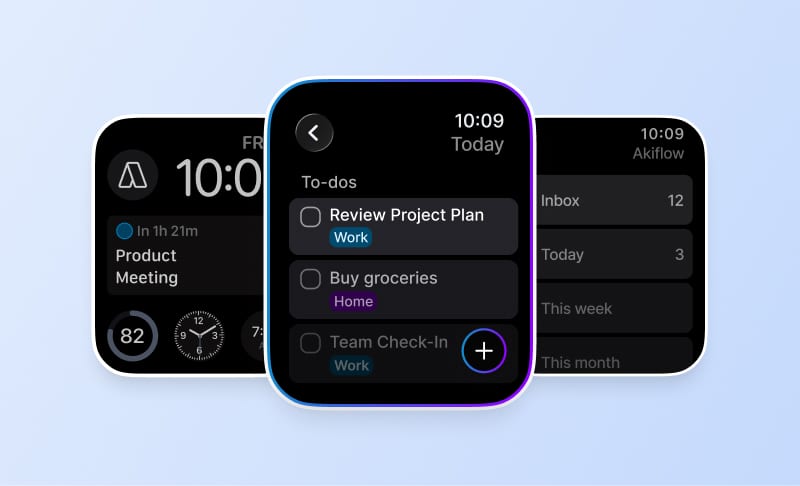
The Apple Watch companion supports task capture by text or dictation, completion and reopening, and views of what is current or next. It requires watchOS 10 or later and a paired iPhone running Akiflow 2.83 or later. It is not a full scheduling editor: Aki, natural-language scheduling, and task editing, rescheduling or deletion are not available on the Watch.
See the iCloud Calendar guide and Apple Watch guide for setup and limits. The Akiflow fall update also covers Travel Time and the desktop redesign.
How to make the decision
Separate your reminder-only items from work that needs a duration. Check whether the latter is genuinely getting protected time before adding another application.
Before changing systems, use a normal busy day rather than an empty demo calendar. Include one changed meeting, one task that takes longer than expected and one new commitment. A useful workflow should make the resulting trade-offs clear without requiring you to maintain conflicting copies of the same work.
Cost and buying considerations
Compare the plan that includes the features you actually need, the billing period, and whether the cost is per person or per workspace. Do not treat a calendar subscription, a native app and a two-way integration as interchangeable paid features.
Check Akiflow’s current pricing before purchasing. This article does not reproduce old promotional prices or unsupported star ratings.
Official sources
Frequently Asked Questions
When might an Apple-native reminders workflow be enough?
Groceries, household commitments and personal follow-ups may fit an Apple-native workflow without another planning application. The reason to evaluate Akiflow is stronger when commitments originate in work systems and need to be planned against several calendars. Treat that as a workflow distinction, not a reason to discard tools already working for you.
Will connecting iCloud Calendar bring my Apple Reminders lists into Akiflow?
No. Akiflow’s iCloud connection handles calendars and events, not Apple Reminders. Those are separate services, so adding the calendar account does not move a household reminders list into the task inbox. Plan any migration with that distinction in mind rather than assuming that one Apple connection includes all your Apple data.
Can scheduled reminders appear alongside events in Apple Calendar?
Yes. Apple Calendar can show scheduled reminders alongside events, including on Apple Watch. That shared view does not turn reminders into calendar events or make them available through Akiflow’s iCloud connection. Akiflow connects to the calendar service, while Apple Reminders remains a separate source of task data.
How do I decide which items need a time block rather than a prompt?
Separate items that only need a reminder from work requiring a duration. Preparing a client presentation, for example, needs a work period that does not collide with meetings. Check whether that longer work is genuinely receiving protected time before adding another application; a simple reminders list and a time-blocking planner can serve different needs.
Can Akiflow’s Watch companion handle my full scheduling workflow?
It is designed for quick capture, completion and checking what comes next, rather than full scheduling. Use the main app to edit tasks or reorganize your day. Text or dictation can capture a commitment on the Watch, but dictating a date does not make that capture natural-language scheduling.