Friday vs Akiflow: Replacing a Discontinued Planner

3

Summary
Friday is discontinued, so choosing a replacement means rebuilding needed functions rather than comparing current subscriptions or device support between two available products.
Separate your personal daily plan from team check-ins and decision records; a calendar-based planner does not automatically replace Friday’s asynchronous communication routines.
List the functions you still need, choose an active tool for each, and assign ownership so replacing a calendar view does not remove team communication.
Reviewed October 17, 2026. Published by Akiflow. This comparison is based on the official documentation linked below, not a hands-on benchmark or an independent review.
Apple Watch and iCloud comparison
Feature | Akiflow | Friday |
|---|---|---|
Apple Watch | Native capture and completion | Discontinued |
iCloud Calendar | Direct two-way event connection | Discontinued |
Friday is discontinued; an Apple Watch feature comparison would misleadingly imply that both products are available. Friday is discontinued. Historical integration information is not evidence of an available iCloud connection today.
Reviewed October 17, 2026. Native Watch apps, mirrored notifications, task-data sync and calendar subscriptions are different capabilities. Unconfirmed means the reviewed sources do not establish support, not that the feature is necessarily unavailable.
Official evidence: Friday source 1; Friday source 2. Akiflow Watch documentation; Akiflow iCloud documentation.
What Friday used to solve
Friday combined daily planning with asynchronous team communication. That distinction matters when replacing it: a calendar-based personal planner can help you organize your own work, but it does not automatically replace team check-ins, written updates or a shared record of decisions.
What this looks like in a real workday
When rebuilding an old Friday routine, start with the outputs your team still needs. A daily personal plan belongs in your planner. Written check-ins and decisions need a shared destination. Assign an owner to each part so that replacing the calendar view does not quietly remove the team’s communication routine.
Replacing the workflow, not just the app
There is no meaningful current Friday subscription or device-support comparison to make. Old Friday marketing pages can still appear in search results; their availability does not establish that the service is operating. Do not start a purchasing decision from the old feature matrix.
Apple Calendar and Apple Watch
Friday: calendar support
Friday is discontinued. Historical integration information is not evidence of an available iCloud connection today.
Friday: Apple Watch
Friday is discontinued; an Apple Watch feature comparison would misleadingly imply that both products are available.
Akiflow: iCloud events and wrist-based capture
Akiflow connects directly to iCloud Calendar. Event changes can sync in both directions, subject to calendar permissions. Scheduling a task does not automatically export it: use Lock to publish a task or Time Slot to an editable calendar. Calendar updates are periodic, not an instant-sync guarantee.
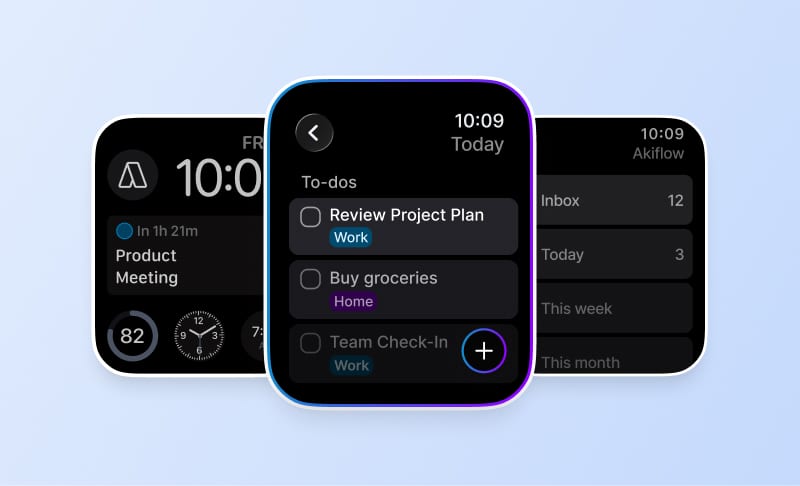
The Apple Watch companion supports task capture by text or dictation, completion and reopening, and views of what is current or next. It requires watchOS 10 or later and a paired iPhone running Akiflow 2.83 or later. It is not a full scheduling editor: Aki, natural-language scheduling, and task editing, rescheduling or deletion are not available on the Watch.
See the iCloud Calendar guide and Apple Watch guide for setup and limits. The Akiflow fall update also covers Travel Time and the desktop redesign.
How to make the decision
List the functions you need to replace: personal planning, recurring check-ins, team updates and documentation. Choose an active tool for each necessary function rather than expecting a single personal planner to inherit every part of Friday.
Before changing systems, use a normal busy day rather than an empty demo calendar. Include one changed meeting, one task that takes longer than expected and one new commitment. A useful workflow should make the resulting trade-offs clear without requiring you to maintain conflicting copies of the same work.
Cost and buying considerations
Friday is discontinued, so historical subscription prices are not a current buying option. Budget separately for personal planning and any team communication functions you need to replace.
Check Akiflow’s current pricing before purchasing. This article does not reproduce old promotional prices or unsupported star ratings.
Official sources
Frequently Asked Questions
Can I still choose Friday as an alternative to Akiflow?
Friday is discontinued, so it should not be treated as a current product option. Historical marketing pages can still appear in search results without showing that the service is operating. Start with the functions you need to replace, then evaluate active tools rather than relying on an old subscription or device-support comparison.
Would a personal planner replace Friday’s asynchronous team routines?
Not automatically. Friday combined daily planning with asynchronous team communication. A calendar-based personal planner can organize your own work, but team check-ins, written updates and shared decisions remain separate needs. Account for those functions explicitly when choosing replacements instead of assuming that a new calendar view also replaces the communication routine.
How should I divide responsibility when rebuilding an old Friday workflow?
Start with the outputs your team still needs. Put the personal daily plan in a planner and give written check-ins and decisions a shared destination. Assign an owner to each part of the workflow. That makes it less likely that replacing the planning view quietly removes a communication routine the team still relies on.
How should I compare replacement costs?
Do not use Friday’s historical subscription prices as a current buying option. Budget separately for personal planning and any team communication functions you still need to replace. Listing planning, recurring check-ins, updates and documentation first helps you compare the active tools needed for the whole workflow, rather than only the calendar portion.
What should I test in the replacement personal-planning workflow?
Use a normal busy day, with a changed meeting, a task that takes longer than expected and a new commitment. Check whether the trade-offs remain clear without maintaining conflicting copies of work. This tests the personal planning part of the replacement; team check-ins and decision records still need their own shared destination.