Summary
Begin with a short calendar and task review, choose priorities, and reserve time for important work before other commitments fill the day.
Batch similar tasks, limit optional notifications during focus periods, and make meetings purposeful with clear agendas, time limits or asynchronous updates where appropriate.
Review the week to decide what needs to change, keep workspaces clear of unnecessary items, and decline or delegate work that does not warrant your time.
Work today moves fast. Between emails, meetings, and constant switching between tools, staying focused is a real challenge.
According to study reports, employees spend nearly 9.3 hours a week just searching for information. That’s more than an entire workday lost. Other studies show that multitasking can reduce productivity by up to 40 percent. It’s no surprise that many professionals feel busy but not productive.
The real problem isn’t effort. It’s the lack of a clear system to manage time and tasks.
In this blog, you’ll find 10 practical ways to improve efficiency and productivity. These strategies are built for modern workflows. They’ll help you stay organized, reduce stress, and get more done, without working longer hours.
Why Efficiency and Productivity Matter More Than Ever?

In 2025, the way we work has changed, again. With hybrid teams, tool overload, and nonstop digital input, staying productive isn’t about working harder. It’s about working smarter.
Here’s why efficiency and productivity are more important than ever:
Work Comes from Every Direction
Tasks no longer live in one place. You might get requests on Slack, updates via email, meeting notes in Notion, and follow-ups through a project tool, all in a single hour. Without a system to manage these moving parts, it’s easy to lose track of what actually matters. Efficient workflows help filter the noise and bring focus back to the work that counts.
Deadlines and Priorities Shift Constantly
Plans change fast. A priority on Monday morning might be irrelevant by Wednesday afternoon. When your schedule is rigid or reactive, it becomes difficult to adapt without falling behind. Productivity today depends on having a flexible structure, a way to reset your focus without starting from scratch.
Business Doesn’t Equal Progress
Many professionals stay busy all day but end the week wondering what they accomplished. This isn’t due to laziness. It’s often the result of scattered effort and constant context switching. In fact, a McKinsey report found that only 9% of leaders feel truly satisfied with how their teams manage time. The issue is rarely about effort. It’s about clarity.
Efficiency Reduces Stress and Burnout
When you know what needs to be done and when you’ll do it, your day feels lighter. You don’t carry around a mental to-do list or scramble to catch up. Efficient work systems reduce pressure and help prevent burnout by giving you structure and breathing room, even on busy days.
It’s About Doing the Right Work, Not Just More Work
Improving productivity isn’t about cramming more into your day. It’s about making space for the tasks that drive results. When your workflow is intentional, you can say no to distractions and yes to progress. That’s the shift that helps high-performing professionals stay focused, calm, and effective.
10 Ways to Improve Efficiency and Productivity at Work

Improving how you work doesn’t always require big changes. Often, a few simple habits and smart systems can make your day feel more focused and less chaotic.
Here are 10 practical ways to improve efficiency and productivity, without working longer hours.
1. Start Your Day With a Clear Plan
How you start your morning shapes the rest of your day. Without a plan, it’s easy to dive into messages or small tasks and lose hours before tackling anything important.
Set 5–10 minutes aside each morning to review your calendar and task list. Choose your top priorities. Block time for them before your schedule fills up. Whether it’s a handwritten to-do list or a digital planning tool, this quick check-in gives your day structure and focus from the start.
2. Use Time Blocking to Structure Your Workday
Time blocking means assigning specific hours to specific tasks. Instead of working from a long to-do list, you decide when each item will happen.
This method helps you reduce multitasking and build momentum. You can group similar tasks together and protect your focus time. Start with 1–2 blocks per day and gradually expand. Tools with drag-and-drop calendar scheduling make this process fast and flexible.
3. Eliminate Task Switching
Switching between tasks may seem harmless, but it drains mental energy. Each time you shift focus, your brain needs time to adjust. That delay adds up and cuts deep into your productivity.
To reduce this, batch similar tasks together. Set “focus windows” for deep work. Turn off notifications during these times to avoid distractions. The fewer times you switch, the faster you get real work done.
4. Set Daily and Weekly Priorities

When everything feels important, it’s hard to know where to begin. That’s why setting clear priorities is essential, both daily and weekly.
Use methods like the “Most Important Task” (MIT) approach or the 1-3-5 rule (1 big, 3 medium, 5 small tasks per day). These systems keep your focus aligned with your goals. Weekly reviews can help you look ahead and plan around deadlines or high-impact work.
5. Limit Meetings and Make Them Count
Meetings take time and energy, often more than they should. Unstructured calls, unclear agendas, and too many participants lead to wasted hours.
Protect your time by keeping meetings short and purposeful. Use clear agendas, set time limits, and consider async updates when possible. The more selective you are with meetings, the more time you preserve for focused work.
6. Use Productivity Tools That Centralize Your Workflow
Jumping between apps slows you down. If your tasks live in one tool, your calendar in another, and your notes in a third, staying organized becomes a task in itself.
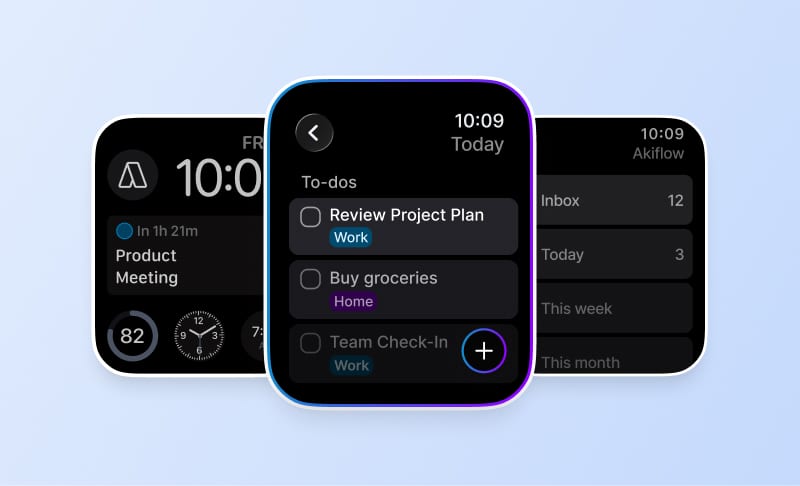
Using tools that combine planning, task management, and scheduling can save hours each week. Centralizing your workflow reduces friction, gives you visibility, and helps you act faster. This is where tools like Akiflow shine bringing your inbox, tasks, and time blocks into one place.
7. Build in Short Breaks to Recharge
Working non-stop isn’t efficient. Studies show that the brain can only focus deeply for about 90 minutes at a time. After that, performance drops.
Use short breaks to reset your focus. Try the Pomodoro Technique (25 minutes work, 5 minutes break) or 90/20 cycles (90 minutes work, 20 minutes rest). Step away from your screen, walk around, or take a few breaths. These small pauses help you come back stronger.
8. Declutter Your Digital and Physical Workspace

Clutter is a silent productivity killer. A messy workspace, whether physical or digital, creates friction and distraction.
Start by clearing your desk and organizing essential items. On the digital side, close unused tabs, archive old tasks, and keep only what you need in front of you. Clean environments support clean thinking.
9. Review and Reflect Regularly
Productivity isn’t just about execution. It’s also about reflection. Weekly reviews give you a chance to pause, evaluate, and adjust.
Look at what went well, what didn’t, and what needs to change. This habit helps you stay aligned with your bigger goals. It also prevents you from repeating the same mistakes or carrying unfinished work forward without intention.
10. Learn to Say No (or Delegate)
Overcommitting is a hidden cause of burnout. Every time you say yes to something unimportant, you take time away from what truly matters.
Learn to protect your time by setting clear boundaries. Say no when a task doesn’t align with your goals. Delegate when someone else can do it better or faster. Time is your most limited resource so treat it that way.
How can Akiflow help with productivity?
Akiflow helps boost productivity by turning your scattered tasks and calendar into one streamlined workflow. Instead of jumping between apps, you can capture tasks, schedule them with time blocks, and review your priorities all in one place.
Here’s how it supports better productivity:
Centralized Task Management: Pulls tasks from Gmail, Slack, Notion, and more into a single inbox so nothing gets missed.
Time Blocking Made Easy: Drag and drop tasks into your calendar to protect focus time and stay on track.
Built-in Planning Rituals: Use daily and weekly reviews to reflect, reset, and realign with your goals.
Fewer Distractions, More Control: With your schedule clearly laid out, you spend less time deciding and more time doing.
By combining structure and flexibility, Akiflow gives you the tools to plan smarter, focus better, and make real progress every day.
Conclusion
Productivity isn’t about doing more. It’s about doing what matters, with clarity and focus.
Small shifts in how you plan, prioritize, and protect your time can lead to big results. Whether it’s time blocking your calendar, reducing task switching, or using the right tools to stay organized, each step helps you work smarter, not harder.
You don’t need a complex system to be efficient. You need a workflow that fits the way you actually work.
Start with one or two strategies from this list. As they become habits, your day will feel less reactive and more intentional. And if you want a tool that brings it all together, your tasks, your schedule, your focus, Akiflow is built for exactly that. Try Akiflow free and take control of your day, one block at a time. Start your free trial today!
Frequently Asked Questions
What belongs in a short morning planning session?
Spend five to ten minutes reviewing your calendar and task list, choosing top priorities and reserving time for them. A handwritten list or digital planning tool can support the check-in. The key is to decide what deserves attention before messages and smaller tasks take over the day.
How can I start time blocking without rebuilding my whole schedule?
Start with one or two blocks per day and expand gradually. Assign those periods to specific tasks, grouping similar work where useful. During focus windows, turn off notifications that would interrupt the planned activity. This starts with a small scheduling change rather than a completely new daily system.
How can I make meetings more purposeful?
Use a clear agenda, set a time limit, and keep the meeting focused on its purpose. Consider asynchronous updates when they can serve the need instead of another call. Being selective about meetings leaves more of the calendar available for the focused work you have already prioritized.
What should I clear from my workspace?
Organize the desk around essential items and remove unnecessary clutter. On the digital side, close unused tabs, archive old tasks and keep the material you need in view. These are concrete changes to the physical and digital work area, alongside the separate work of choosing priorities and scheduling tasks.
How do I use a weekly review to avoid carrying everything forward?
Look at what went well, what did not and what needs to change. Review upcoming deadlines and high-impact work rather than moving every unfinished item forward without thought. Reconsider tasks that do not align with your goals, and delegate when someone else can handle the work better or faster.