
Summary
Keep work and personal calendars separate if you need to, but make both visible in one view so you can catch conflicts before they turn into reschedules and apologies.
Time block deep work, errands, meals, family time, and short buffers so your day reflects what actually fits instead of letting meetings consume every open slot.
Choose one calendar interface as your command center, then do a quick weekly review to spot overlaps, protect priorities, and adjust before the week drifts.
Your work calendar says “client call at 2:00,” but your personal calendar had your kid’s dentist appointment booked weeks ago. You only realize the conflict when it’s too late, and now you're juggling reschedules, stress, and apologies.
This is the daily reality for professionals managing life across two calendars. With hybrid work, shifting hours, and personal obligations bleeding into the workday, keeping everything aligned has become harder than ever.
Coordinating availability across separate calendars can add administrative work before a meeting even starts. Bringing work and personal commitments into one view can make scheduling conflicts easier to spot.
Managing separate calendars creates decision fatigue, missed moments, and unnecessary friction.
The good news? There’s a smarter, more integrated way to manage both calendars without dropping the ball.
Must Read: Effective Scheduling Tactics to Maximize Productivity - Akiflow
The Real Cost of Managing Separate Calendars
On paper, keeping your work and personal calendars separate might seem like a smart boundary. But in practice, it often creates more chaos than clarity.
Without a unified view of your time, you're left piecing together your day like a puzzle, flipping between tabs, rechecking commitments, and hoping nothing slips through the cracks.
Here’s what that really costs you:
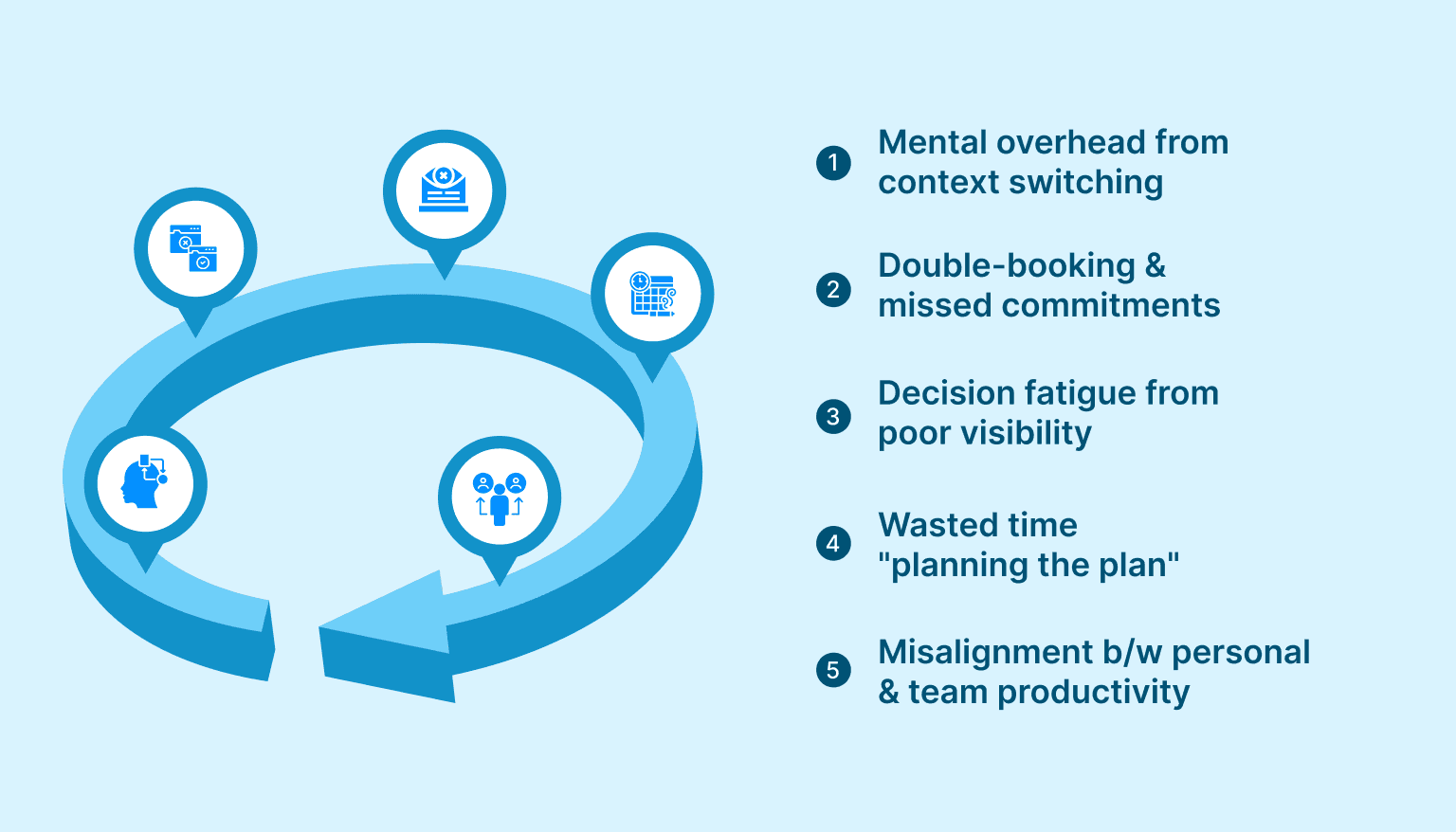
Mental overhead from context switching: Constantly toggling between calendars (and mental roles) eats away at focus. It’s about the energy you spend trying to remember what’s where.
Double-booking and missed commitments: Your team sees a free slot and books a meeting, right when you’re supposed to be at your friend’s wedding or your kid’s school event. Without visibility, personal time gets overwritten by accident.
Decision fatigue from poor visibility: You can’t make confident choices about your day when you don’t see the full picture. Every meeting invite or time block becomes a guessing game.
Wasted time "planning the plan": Managing two calendars means managing two systems. More friction. More admin. More time spent figuring out when you can actually do the work.
Misalignment between personal and team productivity: You can’t show up well at work if you’re constantly adjusting for hidden personal obligations. You need a workflow that supports both sides of your life, without making you choose between them.
These challenges aren’t just frustrating, they’re solvable. The key is building a calendar workflow that supports both clarity and flexibility. Here’s how to do that in a way that actually works.
Must Read: Task Switching and Multitasking - Akiflow
Five High-Impact Strategies to Manage Work and Personal Calendars Seamlessly
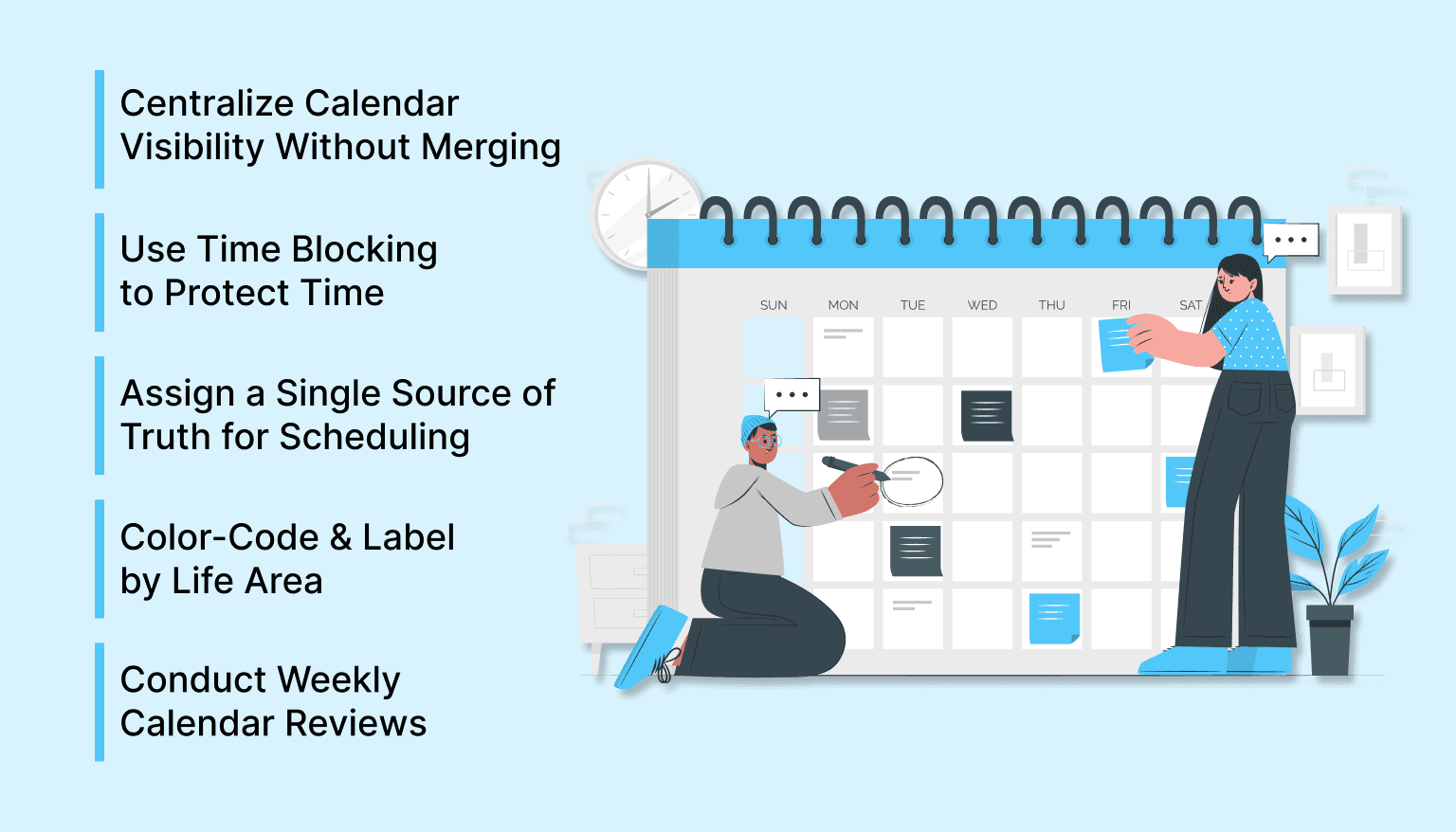
Managing two calendars doesn't have to mean double the effort. The key is building a workflow that lets you see, schedule, and act with clarity. These five strategies are good to remember if you are wondering how to manage work and personal calendars.
1. Centralize Calendar Visibility Without Merging Everything
Trying to manage two separate calendars in isolation increases the chances of conflict and missed commitments. At the same time, fully merging personal and work calendars may not be realistic or secure, especially when sharing calendars with colleagues or clients.
The key is visibility. Use a system that allows you to view both calendars side by side, even if they’re technically separate. This lets you stay aware of all commitments in real time, while still preserving boundaries between work and personal life.
Tools that support read-only subscriptions or multi-calendar views make this process simple. You don’t have to combine everything. You just need to see everything in one place.
2. Time Block with Intention to Protect What Matters
Time blocking is one of the most effective ways to translate intentions into action. Instead of letting your day be dictated by meetings or last-minute requests, block time for what matters, on both sides of your life. By pre-allocating space for your most important work and personal responsibilities, you reduce decision fatigue, avoid scheduling conflicts, and create a workflow that supports balance and focus.
Schedule time for:
Deep work sessions that require full concentration
Personal errands and appointments
Breaks, meals, and recovery time
Family time, self-care, and non-negotiable personal space
By assigning time slots to each category, you create protected spaces that reduce decision fatigue and prevent tasks from spilling over into one another. This increases productivity and helps maintain healthier boundaries between work and life.
3. Choose One Calendar Interface as Your Command Center
When you’re responding to invites or making plans, switching between multiple calendars leads to confusion and errors. Professionals often designate one calendar interface as their primary decision-making space, even if events are synced from elsewhere.
This “source of truth” calendar becomes the place where you:
Check availability
Accept or decline new events
Block off time for focused work or personal obligations
By streamlining your scheduling decisions into one tool, you minimize context switching and reduce the risk of accidental conflicts. The goal is to centralize clarity.
4. Use Color and Labels to Instantly Understand Your Day
Visual structure can be just as powerful as written structure. Using color-coding or labels to differentiate types of events allows you to quickly scan your calendar and understand where your time is going.
Consider assigning colors or labels based on:
Work vs. personal
Meeting vs. solo work
High focus vs. admin tasks
Physical location (in-person vs. virtual)
This visual segmentation helps reinforce balance and makes it easier to adjust your schedule when needed. It also supports mental switching, so you’re not carrying work stress into family time, or vice versa.
5. Make Weekly Reviews a Habit, Not an Afterthought
Even the best calendar systems drift if they aren’t reviewed regularly. A weekly calendar review, typically on Sunday evening or Monday morning, helps you enter the week with intention instead of urgency.
During your review:
Scan for overlaps or missing transitions
Confirm that top priorities are actually scheduled
Adjust any blocks that no longer make sense
Look for opportunities to batch similar activities
This 15–20 minute habit can prevent hours of wasted time later in the week. It’s also a chance to make sure your calendar reflects your real goals, not just your obligations.
Even with a solid system in place, small habits can quietly derail your progress. Let’s look at the common mistakes that can throw your calendar off track, without you realizing it.
Must Read: Boost Your Productivity with a Smart Weekly Task List - Akiflow
Most Common Mistakes Professionals Make
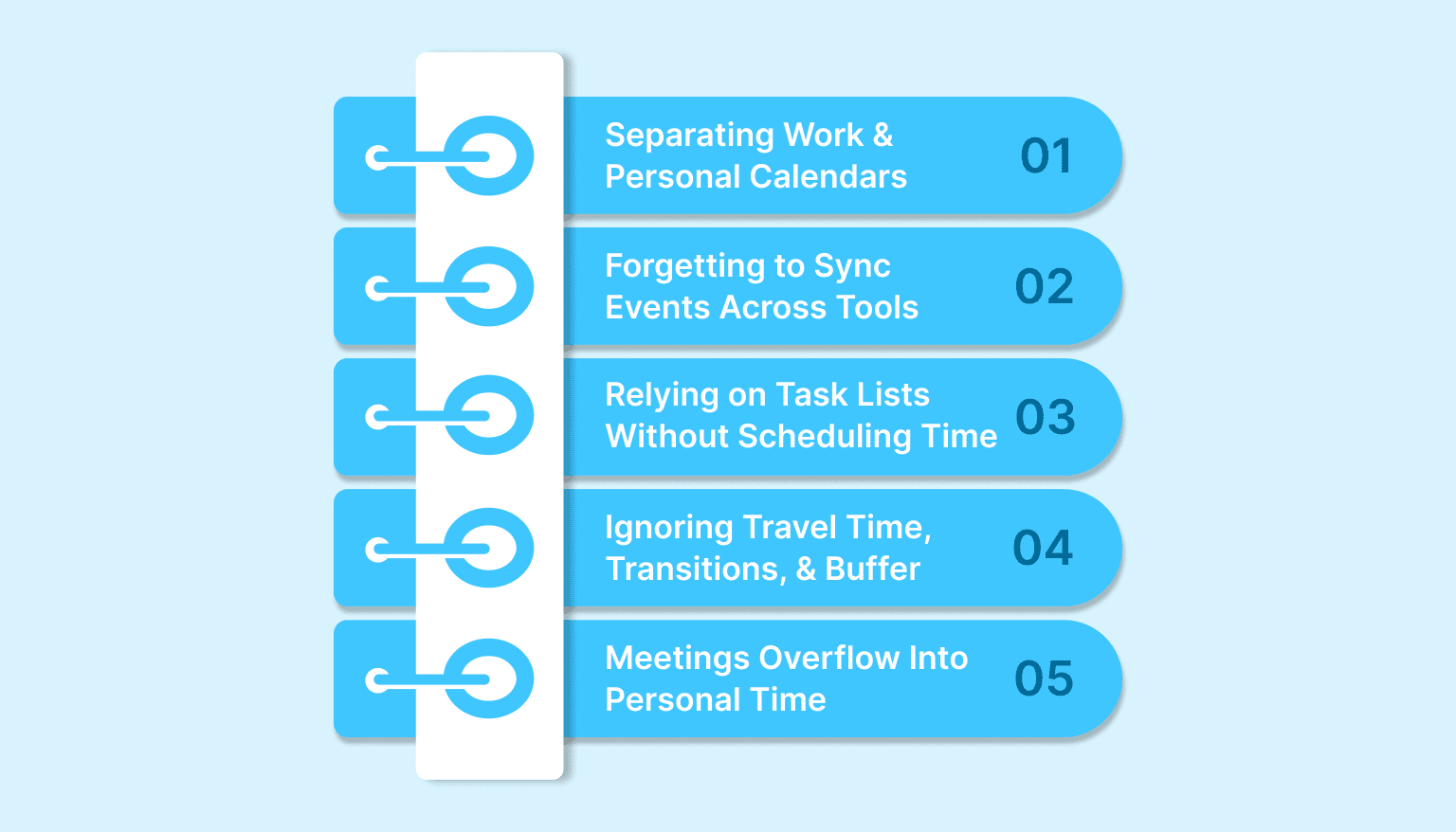
Even experienced professionals fall into patterns that disrupt their scheduling systems. These mistakes aren’t always obvious, but they slowly create friction, reduce reliability, and increase stress throughout the week.
Here are some of the most common calendar management pitfalls to avoid when juggling work and personal commitments:
1. Treating Work and Personal Calendars Like They’re Completely Separate
Work and personal responsibilities constantly influence each other. A late meeting might delay dinner plans. A school event might overlap with a team check-in. When you plan as if these two calendars exist in isolation, you miss the reality of how your time is actually used.
Effective calendar management acknowledges that both types of commitments pull from the same 24 hours. Keeping them visible, even if not merged, helps prevent avoidable conflict and keeps your planning grounded in real-world logistics.
2. Forgetting to Sync Events Across Tools
Many people use separate platforms for work and personal calendars, Google Calendar for one, Outlook for the other, for example. The problem arises when these calendars don’t sync or aren’t reviewed together.
A common outcome: accepting a meeting invite, only to realize later you had a personal appointment at the same time.
Avoid this by setting up read-only feeds or calendar subscriptions, or by conducting a quick daily check across both platforms. Even a two-minute sync can prevent hours of rework and frustration.
3. Relying on Task Lists Without Scheduling Time
To-do lists are useful for capturing work, but without actual time on your calendar, those tasks often remain aspirational. If everything stays on a list with no assigned time, you risk either overloading your day or pushing important tasks indefinitely.
By scheduling tasks directly into time slots, you create realistic expectations and reduce mental clutter. This also helps you see where there’s genuine capacity versus wishful thinking.
4. Ignoring Travel Time, Transitions, and Buffer Blocks
Back-to-back events might look efficient on paper, but in reality, they rarely work. Commute time, mental reset between meetings, or just getting from one room to another all require transition time.
Failing to account for these gaps leads to stress, lateness, and an unrealistic sense of productivity. Build in small buffers, 10 to 15 minutes between events, so your schedule reflects what’s humanly possible, not just what fits on screen.
5. Letting Meetings Overflow Into Personal Time
When work calendars are open but personal commitments aren’t visible, it’s easy for others to fill in every available block. Without boundaries in place, you may find your evenings or early mornings unintentionally consumed by overflow meetings or “just one more” task.
Protect your personal time by blocking it out clearly, even if it’s just for dinner, downtime, or exercise. If it’s not on the calendar, it’s easy to overlook, and over time, this can lead to burnout and resentment.
Avoiding these mistakes sets the foundation, but having the right tool can make it much easier to stick with better habits. Here’s how Akiflow simplifies the entire process.
Must Read: Time Blocking for Students: A Simple Guide - Akiflow
How Akiflow Solves the Calendar Chaos?
Managing work and personal calendars doesn't have to mean juggling tabs, checking multiple apps, or hoping nothing slips through the cracks. Akiflow is built for professionals who want a single, clear view of their time, without the friction of scattered systems.

Here’s how it helps you stay in control:
Unified Calendar + Task View: Akiflow brings your calendars and tasks into one clean interface. Instead of switching between your calendar and to-do list, you can see everything in a single timeline, meetings, events, and actionable tasks.
Drag-and-Drop Time Blocking: With simple drag-and-drop functionality, you can move tasks directly into your calendar. This turns your plans into scheduled action and helps you realistically map out when work will get done no matter it’s a project deadline or any personal errand.
Flexible Calendar Integrations: Akiflow integrates with multiple calendar platforms, including Google Calendar and Outlook, allowing you to view personal and work calendars together, without actually merging them. This keeps your events in context while preserving privacy and control.
Smart Inbox for Task Capture: Tasks come from everywhere i.e., emails, Slack messages, meeting notes, browser tabs. Akiflow’s smart inbox helps you capture all of them instantly from tools you already use.
Built-In Weekly and Daily Reviews: Akiflow supports a built-in review process, helping you reflect on your schedule, reschedule missed tasks, and adjust your plans with clarity.
No More Tab Chaos: Instead of bouncing between apps, extensions, and calendar tools, Akiflow becomes your single control center. You can plan, schedule, review, and adjust, all without opening five different windows.
With features that reduce friction and improve visibility, Akiflow helps you spend less time managing your schedule and more time moving through it with confidence.
Conclusion
When your schedule is fragmented across apps, roles, and responsibilities, even small misalignments can lead to stress, missed commitments, or wasted hours. But with the right system in place, one that gives you full visibility and lets you act with intention, you can take back control of your day.
When you can see everything that matters in one view, you plan better, follow through more consistently, and shift gears without scrambling.
If you’re ready to stop managing your life across disconnected calendars and endless to-do lists, it’s time to simplify. Try Akiflow free and experience the difference a unified workflow makes. Start your free trial. No clutter, no friction, just your time, organized.
Frequently Asked Questions
Should you keep work and personal calendars separate or combine them?
Keep them technically separate when you need privacy or shared-access boundaries, but stop planning them in isolation. View both calendars together or subscribe one into the other so you can see the same 24 hours in one place. That gives you context for accepting invites without exposing personal details.
What should you do first if meetings keep colliding with personal appointments?
Pick one interface as your scheduling command center and check availability there before you accept anything. Then make personal commitments visible in that same view, even as read-only events. You reduce context switching, see conflicts sooner, and stop guessing whether a slot is truly free.
How should you time block both work and life without overpacking the day?
Put more than work tasks on the calendar. Block deep work, errands, meals, recovery time, family time, and other non-negotiables, then add 10 to 15 minute buffers between events. That turns intentions into protected time and keeps your schedule closer to what is humanly possible than what looks tidy on screen.
How often should you review your calendars to stay on track?
Do a weekly review, ideally Sunday evening or Monday morning, to scan for overlaps, confirm priorities are actually scheduled, and adjust blocks that no longer make sense. Pair that with a quick daily check if you use separate tools. The point is to enter the week with intention, not spend it reacting to surprises.
What mistakes quietly derail a two-calendar system?
The biggest traps are planning work and personal time as if they never interact, accepting invites without syncing both tools, and keeping important tasks on a list instead of on the calendar. Add transition buffers and block personal time clearly, or back-to-back meetings and overflow requests will keep stealing time you already meant to use elsewhere.


