Summary
Connect daily priorities to weekly or quarterly objectives before filling the calendar. Select a few meaningful tasks and check the commitments already occupying your day.
Assign focused work, meetings, administration and breaks their own time blocks. Group similar tasks and schedule demanding work when you personally tend to concentrate well.
Use an evening reset to record progress and move unfinished work. In a weekly review, examine repeated postponements and differences between the plan and reality.
Many professionals feel stuck in a cycle of overwhelm and distraction. You start the day with good intentions, but quickly get pulled into emails, Slack messages, and back-to-back meetings. The cost of these interruptions adds up fast. A practical first step is to notice which interruptions recur and reserve a focused block for your most important task.
Most knowledge workers report less than three hours of focused, productive time per day. And the payoff for planning is significant. ZoomShift found that spending 10 to 12 minutes planning your day results in a daily time savings of almost two hours, a 25 percent improvement in performance and productivity.
Without a plan, your day gets hijacked. With one, you work with direction instead of reacting to whatever comes your way.
How to Set Daily Goals That Support Long-Term Success
Before you start dragging tasks onto your calendar or writing a to-do list, pause. Ask yourself: What am I working toward, and why does it matter today?
Planning your day in isolation from your long-term goals can lead to productive-looking days that don’t actually move you forward. The goal isn’t just to stay busy, it’s to stay aligned.
Start by identifying what success looks like for you right now. That could mean:
Progress toward a quarterly OKR (objectives and key results)
Completing a deliverable that unlocks work for others
Making time for a personal priority, like training or writing
Removing a blocker that’s been holding you back
Your “why” doesn’t have to be profound, but it should be specific. Without that clarity, it’s easy to fill your day with shallow work that feels productive in the moment but leaves no real impact.
Here’s a simple method to keep your goals in focus:
Review your weekly or quarterly objectives before you plan each day
Highlight 1 to 2 tasks that contribute directly to those outcomes
Use tags or labels to connect daily tasks with broader priorities
The purpose of daily planning isn’t just to get things done. It’s to make sure the things you do matter.
The Best Daily Planning Routine: Morning and Evening Habits

Daily planning is not a one-time task. It works best as a rhythm that starts in the morning and resets at night.
Morning: Set the Direction
Your morning routine should bring structure, not stress. A short check-in can give you clarity and help you stay in control of your day.
Use this simple structure:
Review your calendar to see what’s already committed
Scan your task list and select your two or three most important tasks
Time block your day to carve out space for deep work, meetings, and breaks
Include buffer time between tasks to absorb overruns or unexpected delays
The goal is to begin with intention rather than reacting to whatever pops up first.
Evening: Reset and Reflect
An evening ritual helps you close the day with a clear head and prepare for tomorrow without carrying mental clutter into the night.
Keep it short and focused:
Note what you accomplished, especially key wins
Reschedule or adjust tasks you did not get to
Outline your top priorities for tomorrow
Capture stray thoughts or follow-ups while they are fresh
You only need a few minutes. But doing this consistently can make the next morning calmer and more productive.
Also read: 8 Best Daily Planner Apps for Greater Productivity
How to Prioritize Your Tasks: Use These 3 Proven Methods
Not all tasks carry the same weight. A packed to-do list can feel productive, but without clear priorities, it’s easy to spend the day on low-impact work.
Start by identifying your Most Important Tasks, often called MITs. These are the two or three things that, if completed today, would make the day feel successful.
Avoid trying to do everything. Instead, aim to do the right things.
Here are a few proven methods to help you triage your task list:
The Eisenhower Matrix

Sort tasks by urgency and importance. Focus on what is both important and time-sensitive, and schedule the rest accordingly.
The 1-3-5 Rule

Choose one major task, three medium ones, and five smaller items. This creates balance without overloading your day.
The Focus Three

Commit to just three key outcomes for the day. Everything else is secondary.
These tools are not about over-optimizing. They are about protecting your attention so it goes where it counts.
Once you pick your MITs, make them visible. Tag them. Pin them. Schedule time for them. That simple act makes it much more likely they will get done.
Must read: The 4-Tier Task Prioritization Method for Smarter Workdays
How to Use Time Blocking and Task Batching
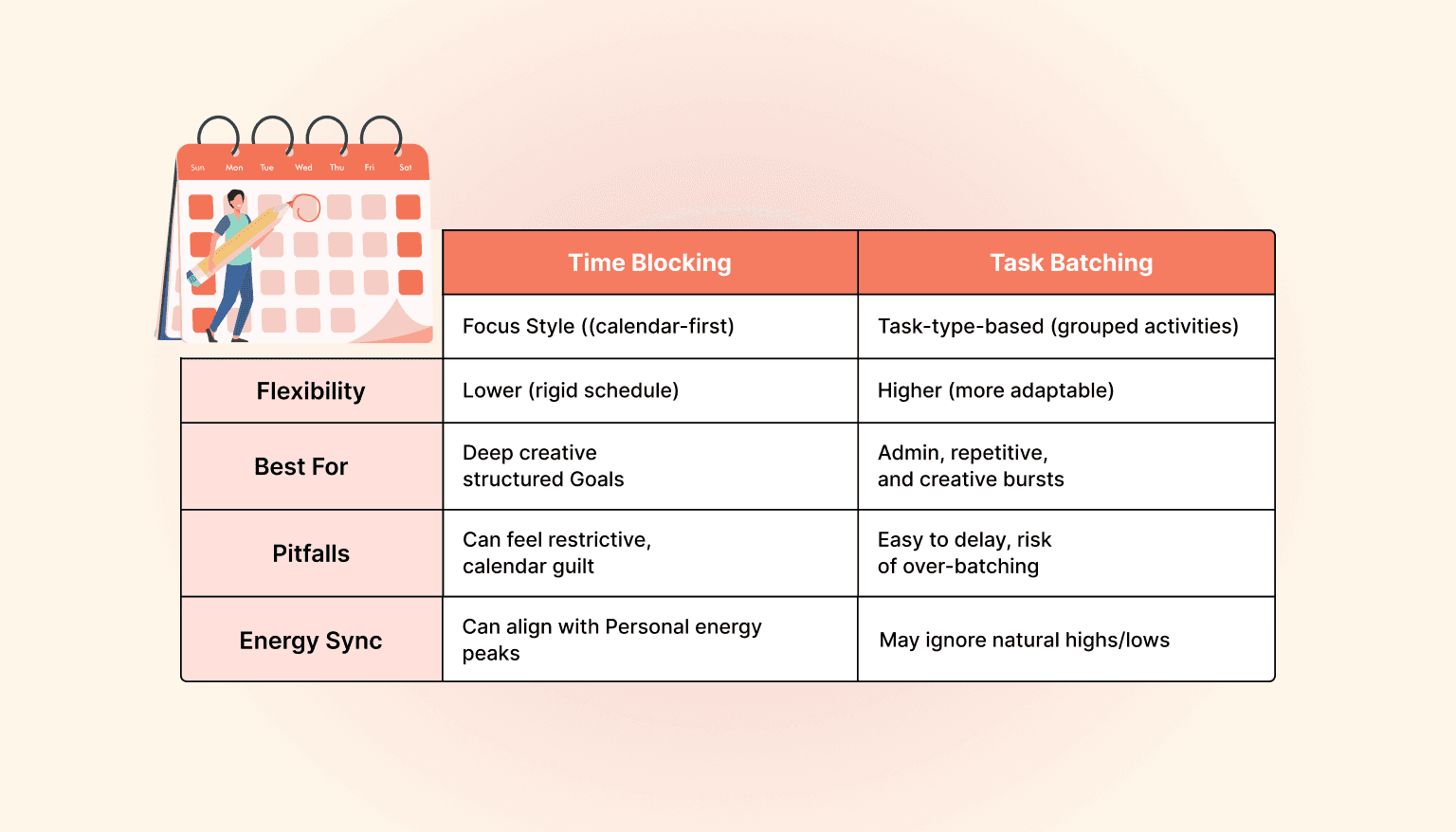
Trying to multitask or jump between unrelated tasks leads to mental fatigue and fragmented focus. Instead, group your work and assign it specific time slots.
Time blocking means assigning chunks of your calendar to focused work. It turns your to-do list into a visual plan you can actually follow.
Here is how to make it work:
Block mornings for deep, creative work when your energy is high
Reserve afternoons for meetings or collaborative tasks
Schedule admin and communication windows together instead of spreading them out
Add short breaks between blocks to reset your focus
Task batching goes hand in hand with time blocking. When you group similar tasks, like replying to emails or reviewing documents, your brain stays in the same mode longer and avoids unnecessary context switching.
By putting structure around your time, you reduce decision fatigue and make it easier to stay in flow. This is where planning turns into actual execution.
Popular read: Top AI Time Blocking Tools to Help You Take Control of Your Calendar
How to Match Tasks to Energy Levels Throughout the Day
Planning your day is not just about fitting in tasks. It is also about matching the right work to your energy levels and protecting your capacity to think clearly.
Most people have natural peaks and dips in focus throughout the day. Pay attention to when you feel sharpest and schedule demanding tasks during that time. Use low-energy windows for lighter work like admin, emails, or cleanup tasks.
A few ways to manage your energy more intentionally:
Block time for breaks just like you would a meeting
Step away from your screen every couple of hours, even for five minutes
Build in movement, like a short walk, between long sessions of seated work
Do not skip meals or delay rest in the name of productivity
Staying productive over time means protecting your mental and physical bandwidth. A well-structured plan that ignores your well-being is not sustainable. When your schedule supports how you actually function, your output improves without burning you out.
Best Productivity Tools to Organize Tasks and Calendar Together

The right tools make planning feel lighter. The wrong ones just add noise. You do not need a complicated tech stack; you need a system that helps you focus and keeps everything in sync.
Here are some tools that pair well with a digital planning setup:
Pomofocus or Focus Keeper for structured focus intervals using the Pomodoro technique
Obsidian or Apple Notes for quick capture, journaling, or organizing ideas
Freedom or Cold Turkey to block distracting websites during deep work sessions
Readwise or Notion to organize and resurface notes, highlights, and learning
Linear or Todoist if you collaborate with a team or need lightweight project views
Google Calendar or Outlook for calendar sync, fully integrated within Akiflow
Toggl Track to log where your time actually goes, useful for weekly reviews
Akiflow brings your tasks and calendar into one clean workspace. It pulls tasks from tools like Notion, Gmail, Slack, Asana, and Trello so you can triage everything in one place. From there, you can schedule tasks directly onto your calendar without jumping between tabs or tools.
What matters most is not how many tools you use, but how well they work together. If your setup helps you capture, prioritize, and protect time for the work that matters, you are already ahead of the curve.
How to Stay Flexible and Use Weekly Reviews to Improve Planning
Even the best plan will need adjusting. Unexpected meetings, urgent requests, or simply slower progress than expected; these are all part of the day.
The goal is not to follow your plan perfectly. It is to have a structure that helps you adapt with less stress.
Here is how to stay flexible without losing focus:

Equally important is reflection. A short weekly review helps you spot patterns, reschedule what slipped, and make smarter decisions next time.
During your weekly review, ask:
What went well this week
What tasks kept getting pushed, and why
Where did your plan and your actual day not match
This small habit creates awareness and helps you improve how you plan, not just what you plan. Over time, your system gets sharper and more aligned with how you actually work.
How Akiflow Helps You Plan with Clarity
If your tasks live in five different apps and your calendar is a separate mess, planning your day becomes another form of friction. Akiflow solves this by giving you one place to bring it all together.
No clutter. No context switching. Just a clear view of what needs to happen and when.

With Akiflow, you can:
Collect tasks from tools like Slack, Gmail, Notion, Asana, and Trello in one inbox
Quickly triage and organize tasks using keyboard shortcuts or the command bar
Drag tasks onto your calendar to time block without switching tabs
Create recurring routines, protect deep work blocks, and auto-reschedule when plans shift
See both your calendar and task list in a single interface built for focused planning
This is not just about being more organized. It is about protecting your time, reducing decision fatigue, and making sure your best work actually gets done.
If you want your planning system to feel as fast and sharp as the way you work, Akiflow is worth trying. Start your free trial and see how it fits your workflow!
Conclusion: Take Control of Your Day
Productivity is not about cramming more into your schedule. It is about choosing what matters, making time for it, and following through without feeling overwhelmed.
Start with your goals. Build simple planning habits into your mornings and evenings. Choose a few tasks that actually move things forward. Use time blocks to protect your focus. Pay attention to your energy. Reflect often. And let your tools support your flow, not interrupt it.
If you want a planning system that gives you clarity without the chaos, Akiflow brings it all together. One workspace for your tasks, your calendar, and your time.
Try it out and see how much easier your day feels when everything is in one place.
Frequently Asked Questions
How do you connect today’s tasks with longer-term goals?
Review weekly or quarterly objectives before planning the day, then identify one or two tasks that directly contribute to them. These might complete a deliverable, remove a blocker or advance a personal priority. Tags or labels can make the connection visible so the day’s choices are not driven only by incoming requests.
What should a morning planning check include?
Review the calendar for existing commitments, scan the task list and choose two or three important tasks. Reserve time for focused work alongside meetings and breaks, leaving buffers for overruns. The purpose is to establish a workable direction for the day rather than assume every item on the list must fit.
How should you choose when to do demanding work?
Pay attention to when you feel sharpest and use those periods for demanding tasks. Put lighter work, such as administration or email, into lower-energy windows. Combine that observation with the commitments already on the calendar, and include breaks rather than relying on a fixed assumption that everyone’s best hours are the same.
What belongs in an evening planning reset?
Record what you accomplished, reschedule or adjust unfinished tasks and outline the next day’s priorities. Capture follow-ups and stray thoughts while they are still fresh. Keep the reset brief and focused on the next plan, rather than leaving incomplete work and new ideas scattered until the morning.
What should a weekly review reveal about daily planning?
Ask what went well, which tasks kept being postponed and where the planned schedule differed from the actual day. Look for patterns rather than only counting completed tasks. Use those observations to adjust future plans and reschedule work that slipped, especially when unexpected meetings or slower progress repeatedly change the day.