
You sit down at your desk, ready to tackle the day, but soon find yourself pulled in multiple directions, with emails, meetings, and urgent tasks piling up. It’s easy to feel scattered and struggle with prioritizing.
Now, picture dedicating specific blocks of time to focus solely on one task at a time, minimizing distractions, and making real progress.
Time blocking offers a solution. In fact, 58% of hybrid workers use time blocking to manage distractions and stay in control of their day. Initially popularized by productivity experts like Cal Newport, time blocking helps you structure your day intentionally, ensuring that each hour has a clear purpose.
In this blog, we’ll explore how time blocking works, how to implement it in your routine, and the benefits it can bring to your productivity.
Key Takeaways
Research indicates that as much as 60% of work hours may be consumed by low-value or reactive tasks.
Time blocking boosts productivity and reduces distractions, according to multiple studies.
Breaking tasks into manageable blocks helps prevent procrastination, with 58% of workers using time-blocking methods to manage their workday effectively
Structured schedules enhance task prioritization and focus, making it easier to meet deadlines and handle urgent tasks.
Time blocking benefits include improved focus, reduced stress, and a clearer work-life balance.
What Is Time Blocking and How Does It Work?
Time blocking is a scheduling method where you divide your workday (or week) into preset blocks of time. Each block is reserved for a specific task or activity.
This turns your calendar into a structured plan, you know when you’ll work on each task, rather than juggling a long to‑do list and switching between tasks at will.
When you adopt time blocking, you shift from reacting to tasks to proactively planning your day. That small change can make a measurable difference.
How Time Blocking Compares to Traditional To-Do Lists
Traditional to-do lists show what needs to get done. Time blocking shows when you will do each item. The shift matters.
With a To‑Do List | With Time Blocking |
Tasks are listed without time estimates. | Each task gets a fixed slot in your calendar. |
Encourages multitasking or task‑switching. | Encourages focused work on one task at a time. |
Easy to lose track — tasks pile up or get postponed. | Creates structure and helps avoid “slipping” tasks. |
Hard to gauge realistic workload. | Makes capacity visible before you accept new work. |
Recent data shows how much of a problem loose scheduling can be: studies report that up to 60% of work hours are spent on low‑value or reactive tasks. Also, 68% of workers say they struggle to get enough uninterrupted time for focused work.
With a structured approach like time blocking, you can reclaim that lost productivity and ensure your workday stays on track. Tools like Akiflow help automate time blocking, allowing you to prioritize important tasks and minimize distractions so you can focus on what truly matters.
Also Read: How Productive People Plan Their Day (And What You Can Copy)
Why Time Blocking Works Well for Scheduling
Using time blocking often leads to better focus, sharper prioritization, and less multitasking. Below are the core reasons this method works, along with recent findings that back those benefits.
What Makes Time Blocking Effective
When you use time blocking, you break your day into defined segments reserved for specific tasks or groups of tasks. This simple shift from reactive work to planned work can change how much you get done.
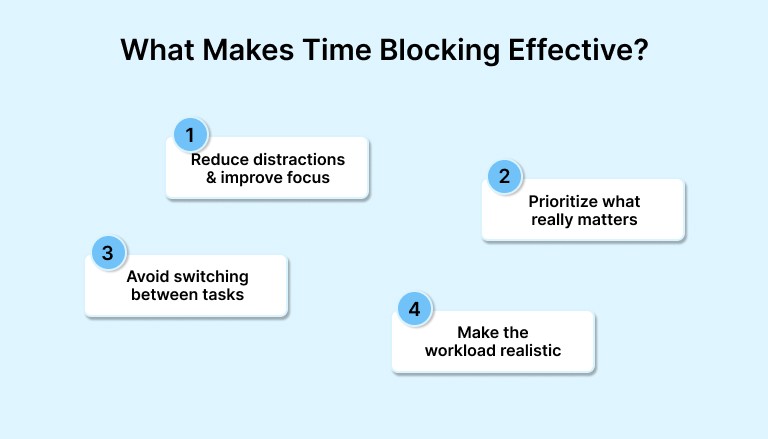
Here’s what time blocking helps you do better:
Reduce distractions and improve focus. Studies show that scheduling 90–120 minutes a day for deep, uninterrupted work helps escape the constant rush of reactive tasks. This leads to better concentration on important work.
Prioritize what really matters. Blocking time forces you to estimate how long a task will take and assign it a slot. That makes you less likely to overcommit or accept more work than you can handle.
Avoid switching between tasks. Every time you switch tasks, you lose momentum and mental clarity. Time blocking reduces such context switching, helping you stick with one task long enough to finish it well.
Make the workload realistic. A blocked day visualizes your capacity. If your calendar is full, it signals you’re at capacity, discouraging overbooking or impulsive commitments.
Also Read: Eating the Frog: How to Do the “Eat the Frog” Technique
Why Time‑Blocking Apps Matter and How to Use Them
Time‑blocking works best when your planning method stays reliable. A core challenge many busy professionals face is juggling too many tools, calendars here, to‑do lists there, and meetings in another app. When your schedule spans multiple platforms, it’s easy to lose track.
Using a good time‑blocking app brings tasks, calendar events, and reminders into a single view. That reduces friction when you try to plan, helps you spot conflicts early, and makes it easier to stick to your schedule.
With that as context, here are today’s popular tools
Tool | What It Does Well |
| |
Motion |
|
Sunsama |
|
Todoist |
|
TickTick |
|
Planyway (for Trello/Jira users): |
|
Also Read: Location-Based Reminders: Do They Really Boost Productivity?
How to Begin Using Time‑Blocking (Step‑by‑Step)
Here’s a straightforward path for setting up time‑blocking, whether you use a simple calendar or a dedicated tool.
Gather all tasks and commitments: List every task, meeting, errand, or project — personal or work‑related. This gives you a full view of what you need to schedule.
Estimate how long each item will take: Assign realistic durations to each task. This helps avoid overbooking and gives you a clearer sense of your daily capacity.
Block out your time: For each task, create a time block on your calendar. Add labels or categories (focus work, meetings, admin, breaks) for clarity.
Treat blocks as appointments with yourself: When a block begins, remove distractions (notifications, social media). Focus only on the task until the block ends.
Review and adjust regularly: At day’s end or week’s end, compare what you planned vs what you completed. Adjust future estimates and re‑allocate unfinished tasks.
Use the app’s features to stay on track: Tools like Akiflow let you snooze tasks, reassign blocks, or automatically move unfinished work, helping your schedule stay realistic even when things change.
Still unsure if time blocking is right for you? Let’s look at some real-world examples and research to see how others have benefited.
Case Studies & Recent Research on Time Blocking
Recent studies and real-world reports emphasize the significant benefits of time blocking for individuals and organizations alike. Time blocking helps reduce distractions, improve productivity, and regain focus.
Here are a few examples that demonstrate its effectiveness:
The Time Management Crisis and Time Blocking as a Solution
A 2025 study examining the “time management crisis” found that professionals often struggle with constant context switching — back-to-back meetings, email overload, and unexpected interruptions.
This fragmentation of focus leads to decreased productivity. The study highlighted how time blocking helped mitigate these issues by setting aside dedicated periods for focused, uninterrupted work, ultimately improving work quality and reducing stress.
Case Study: Senior Professional Boosts Output by 30% with Time Blocking
For example, a professional could divide the day into separate blocks for strategic work, meetings, and personal time. The aim is to give each commitment a realistic place in the schedule, then review what worked and adjust the next day.
Time Blocking in Education: Boosting Engagement and Reducing Distractions
Time blocking isn’t just limited to the workplace. A 2025 study of over 1,000 students found that those who used time‑management tactics, such as time blocking, during their study sessions had stronger engagement and less reliance on distractions.
Also Read: Deadline Management: Smarter Ways to Stay on Track
As time-blocking becomes more popular, productivity tools are evolving to support this approach. Here’s a look at where these tools are headed and how they can help you.
Where Scheduling and Productivity Tools Are Headed
Work patterns are evolving as hybrid and remote models continue to rise, creating a need for greater flexibility and the ability to manage frequent context switching.
As these changes take shape, productivity tools are also adapting to meet the demands of modern work environments better.
Here are some emerging trends in productivity tools and what they mean for you:
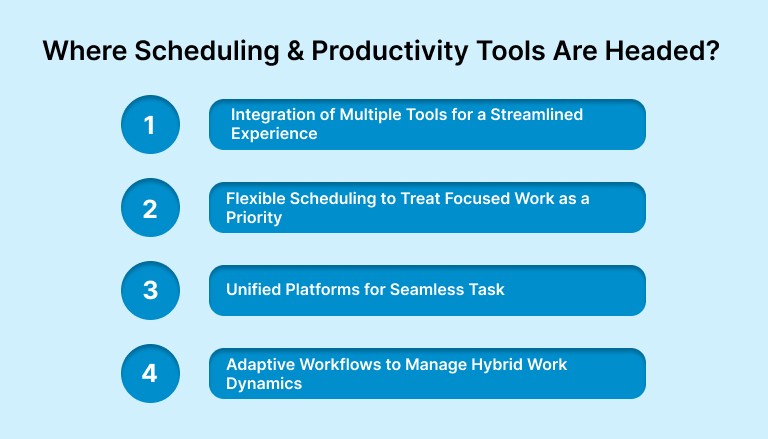
1. Integration of Multiple Tools for a Streamlined Experience
Modern productivity tools are increasingly focused on integration. Many platforms now combine tasks, emails, calendars, and reminders in a single view.
This integration reduces friction and simplifies managing multiple apps, keeping everything organized in a single place.
2. Flexible Scheduling to Treat Focused Work as a Priority
Another key trend is the rise of flexible scheduling. More apps now let users block time for focused work, treating these blocks with the same importance as meetings or appointments.
This shift emphasizes the value of uninterrupted, deep work, helping professionals structure their day to protect these critical focus periods.
3. Unified Platforms for Seamless Task and Schedule Management
For professionals juggling many tools and inputs, unified platforms are becoming increasingly valuable. These platforms let you pull tasks from different apps, schedule them efficiently, and adjust them in real time as priorities shift.
This is especially useful when your workday is unpredictable, and tasks need to be rearranged quickly.
4. Adaptive Workflows to Manage Hybrid Work Dynamics
With remote work becoming the norm, professionals now require adaptive workflows that can adjust to changing demands. Instead of relying on static to-do lists, tools are evolving to help users plan, track, and adjust their time blocks in real-time.
Also Read: Time management strategies for ADHD adults
The Ultimate Productivity Tool for Time Blocking
Most people fail at time blocking because their tasks sit in one place, their schedule lives elsewhere, and priorities change faster than their calendars update.
Akiflow solves this by bringing tasks and calendar planning into a single, flexible system that makes time blocking practical every day.
Why This Matters for Time Blocking
Time blocking only works when tasks are clear, scheduled, and easy to adjust. Akiflow removes the friction that typically disrupts the system, such as scattered inputs, unclear priorities, and constant rescheduling, so your time blocks stay accurate and meaningful.
How Akiflow Solves Time-Blocking Pain Points:
1. One place to see everything: Unified inbox for email tasks, Slack messages, project tools, and quick notes.
Why it matters: You can’t block time for tasks you forget to capture. Akiflow centralizes everything so nothing gets missed when planning your day.
2. Visual planning: Drag-and-drop time blocking on your calendar.
Why it matters: Turning tasks into scheduled blocks becomes effortless, helping you create a realistic plan instead of a hopeful to-do list.
3. Fast rescheduling: Real-time drag-to-reschedule + “replan undone tasks.”
Why it matters: Time blocking requires flexibility. When a meeting runs long or priorities shift, your schedule adjusts in seconds without breaking your flow.
4. Clear priority structure: Priority tagging across tasks and projects.
Why it matters: Time blocks should reflect importance. Akiflow shows what truly matters, so high-impact work gets the best hours of your day.
5. One timeline for everything: Full calendar + task integration in one interface.
Why it matters: You avoid double booking, identify true available hours, and block time based on real capacity instead of guesswork.
6. Protected focus sessions: Focus-friendly scheduling that encourages commitment to each block.
Why it matters: Time blocking fails when interruptions take over. By treating each block as a dedicated session, you stay focused and reduce context switching.
Conclusion
Time blocking has solid backing from recent research and practical experience. Studies show that carving out dedicated blocks for focused work, rather than reacting to every notification or email, helps reduce distraction and boost output.
For many professionals, that means clearer priorities, less stress, and more meaningful progress on important work.
If you want to bring that clarity and control to your day, consider a tool like Akiflow. It consolidates all your tasks and calendar events into one place, making it easier to block time and stay on track than juggling multiple apps.
Try Akiflow for free to know more!
FAQs
Q: Can time blocking be used in a team setting?
A: Yes, time blocking can be highly effective for teams. By aligning team members’ schedules and blocking time for collaboration, meetings, or focused work it helps ensure everyone is on the same page and minimizes interruptions.
Q: How do I prevent my time blocks from getting interrupted?
A: To prevent interruptions, communicate your availability clearly to colleagues, set status messages, and use tools like Akiflow to schedule uninterrupted “focus time.” You can also create buffer blocks for urgent tasks or unexpected events.
Q: What’s the best tool for someone new to time blocking?
A: For beginners, tools like Google Calendar are simple to use for time blocking. As you get more comfortable, you can try more advanced tools like Akiflow, which syncs tasks and calendars, making it easier to manage your schedule and prioritize effectively.
Q: How do I know if time blocking is working for me?
A: If you’re finding that you’re completing tasks on time, feeling less stressed, and more in control of your schedule, time blocking is likely working. Monitoring productivity and reviewing how much time you spend on high-priority tasks helps you track your progress.
Q: Can I use time blocking for creative work?
A: Absolutely. Time blocking isn’t just for administrative tasks, it’s great for creative work, too. By dedicating specific blocks of uninterrupted time, you can get into a flow state and produce high-quality work without distractions.


