Summary
Use a weekly planning session to review meetings, deadlines and goals, then reserve focused work time while leaving room for changes.
Capture incoming tasks in one place and sort them into Now, Next and Later so not every item competes for today’s attention.
Finish each day by rescheduling unfinished work, and review the week for progress, blockers and changes to make in the next plan.
Do your days feel rushed and unplanned? You’re not alone. Many professionals spend most of their time reacting instead of focusing.
According to McKinsey, workers spend about 28 percent of their week on email. Over half of employees say they don’t feel productive, even when they stay busy. The real problem isn’t effort. It’s the lack of a plan.
A time management plan gives your day structure. It helps you focus on what matters and avoid constant decision-making. With a clear plan, you feel more in control and less overwhelmed.
In this guide, you’ll learn six simple strategies to plan your time better. These methods are built for real-life time planning. If you lead a team or work by yourself these strategies are very helpful.
Why Time Planning Matters in 2025?

Work today looks nothing like it did a few years ago. We jump between tools, manage tasks across multiple platforms, and face more distractions than ever before. Without a clear plan, the day quickly fills up with other people’s priorities.
Here’s why time planning is essential now more than ever:
More inputs, less clarity: Tasks come in through email, Slack, calendars, and team tools. Without a system to organize them, things get missed or delayed.
Meetings eat up focus time: Back-to-back calls leave little room for deep work unless you protect that time in advance.
Multitasking drains energy: Constant task switching leads to burnout. Time planning helps you stay focused on one thing at a time.
Deadlines shift constantly: Your schedule needs to be flexible but still structured. Planning gives you control, even when things change.
To-do lists are not enough: Writing tasks down is helpful. But without assigning time to them, they remain ideas and not action.
Now that we’ve covered the challenges, it’s time to look at the solutions. Here are six time planning strategies that actually work in real life.
Must Read: How to Improve Time Management Skills in 2025: 5 Strategies That Actually Work - Akiflow
6 Time Planning Strategies That Actually Work

Time planning is about building habits that make your day feel more focused and less rushed. These six strategies are simple, realistic, and built to last.
1. Build a Weekly Planning Ritual
A weekly ritual helps you start with clarity instead of confusion. It gives you time to look ahead, make space for your priorities, and set the tone for the week.
Why it works:
Keeps important work from being pushed aside
Reduces stress before the week even begins
Helps you avoid surprises and overbooking
How to do it:
Choose a time, like Sunday evening or Monday morning
Review upcoming meetings, deadlines, and goals
Block time for focused work before your calendar fills up
Leave room for changes or unexpected tasks
Even 30 minutes of planning can make your entire week more manageable.
2. Time Block Your Calendar With Intention
Time blocking means giving every type of work a specific place on your calendar. It brings structure to your day and protects your focus.
Why it helps:
Reduces constant task switching
Turns to-do lists into scheduled actions
Creates space for deep work, and not for only meetings
How to use it:
Set blocks for focused work, admin, breaks, and calls
Use color codes to separate types of tasks
Avoid back-to-back blocks to prevent burnout
Your day feels calmer when you know exactly what you’re working on and when.
3. Capture Tasks the Moment They Show Up
Trying to remember everything is exhausting. Capturing tasks as soon as they appear keeps your mind clear and your system reliable.
Why it helps:
Reduces mental clutter and forgetfulness
Keeps your list complete and organized
Makes it easier to plan later without missing anything
How to do it:
Use one central place to write down tasks
Capture items from emails, chats, and meetings
Review your list once or twice a day to sort and schedule
The sooner you get tasks out of your head, the faster you can focus again.
4. Prioritize with a “Now, Next, Later” System
Not all tasks need to be done today. This method helps you focus on what matters right now without feeling overwhelmed by everything else.
Why it works:
Simplifies decision-making during busy days
Helps you stay focused without multitasking
Keeps low-priority tasks from stealing your time
How to use it:
“Now” tasks must get done today
“Next” tasks are coming up soon, but not urgent
“Later” tasks can wait or be revisited next week
You can also group tasks by energy or type to make your day flow more smoothly.
5. Create a Daily Reset Routine
A short end-of-day reset helps you reflect, reorganize, and get ready for tomorrow. It brings closure and reduces next-day stress.
Why it helps:
Clears out leftover tasks
Keeps your schedule clean and realistic
Helps you end the day with peace of mind
How to do it:
Take 5 to 10 minutes before wrapping up work
Review what got done and what didn’t
Move unfinished tasks to another day
Add anything new that came up during the day
A reset takes little time but makes a big difference in how the next day starts.
6. Review and Adjust Every Friday
A weekly review keeps your plan aligned with your goals. It helps you stay on track and improve how you manage time over the long term.
Why it matters:
Tracks your real progress
Helps you notice what’s working and what’s not
Prevents small issues from turning into big ones
What to review:
What moved forward and why
What didn’t get done and what blocked it
What to keep, cut, or change next week
This habit helps you end the week feeling in control instead of behind.
These strategies are powerful on their own. But to apply them consistently, you need a tool that brings structure and flexibility together. That’s where Akiflow comes in.
Must Read: Time Blocking for Students: A Simple Guide - Akiflow
How Akiflow Helps You Stick to Your Time Management Plan?

Creating a plan is one thing. Following through with it is a different challenge. Your day often fills up with last-minute requests, shifting deadlines, and endless tabs. That’s where Akiflow makes all the difference.
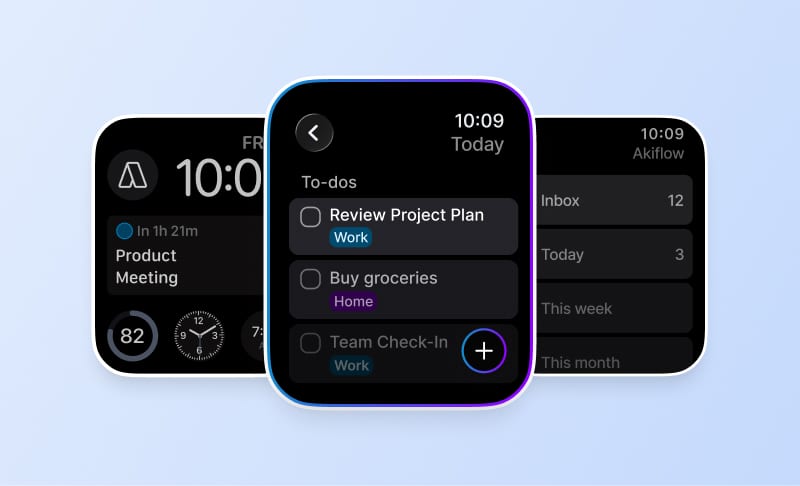
Akiflow isn’t just a task manager or a calendar app. It’s a time planning command center designed for busy professionals who need clarity, structure, and flexibility in one place. Here’s how it supports every part of your time management plan:
Plan Your Week Visually: Akiflow’s Weekly Review Mode helps you map out your upcoming tasks, time blocks, and focus windows before the week even begins. You can lay out your priorities across your calendar and immediately spot any overload, imbalance, or missing focus time. Instead of reacting to the week as it unfolds, you start with a clear visual plan that reflects your goals.
Turn Tasks Into Time Blocks Instantly: Rather than keeping tasks in a list and hoping they’ll get done, Akiflow lets you drag and drop any task directly into your calendar. This simple action turns intention into commitment. Each task becomes a visible part of your day, complete with a start and end time. You stop guessing when you’ll get to something, and start knowing exactly when it will happen.
Capture Tasks From All Your Tools: Tasks come from everywhere i.e., email, Slack, meetings, Notion, and more. Akiflow connects with over 3000 tools to pull all your tasks into a single inbox. That means you don’t have to switch tabs, copy-paste to-do items, or try to remember what was mentioned in that message thread. Everything is centralized, clean, and ready to schedule.
Adjust Your Day As Priorities Shift: Even the best plan needs to bend sometimes. Akiflow makes it easy to adapt as your day changes. You can reschedule a task by simply dragging it to a new time. If a meeting runs over or something urgent comes up you can update the calendar without losing visibility into what still needs to be done.
Reflect and Reset With Daily and Weekly Reviews: Akiflow makes reviews part of your routine. At the end of each day, you can check off what was completed, reassign what wasn’t, and clean up your schedule. At the end of the week, Review Mode helps you see what moved forward and what needs attention next. It’s a simple way to stay aligned with your goals without losing momentum.
Akiflow gives you the structure to plan with intention and the flexibility to adjust with ease. With everything in one place i.e., from task capture to time blocking you spend less time managing your system and more time moving your work forward.
Must Read: https://akiflow.com/blog/best-time-blocking-planner-apps
Conclusion
Time management isn’t just about squeezing more into your schedule. It’s about creating a system that supports clarity, focus, and progress, especially when your day doesn’t go exactly as planned.
A solid time planning strategy helps you make intentional choices instead of reacting to every task or interruption. With habits like weekly planning, daily resets, and task prioritization, your workday becomes something you control. It is no more something that controls you.
The more consistent your planning system becomes, the less energy you waste deciding what to do next. Instead, you move through your day with purpose, confidence, and the space to actually get things done.
If your current approach feels scattered or overwhelming, start small. Pick one of the six strategies and build from there. The goal isn’t perfection. It’s progress you can repeat.
Your time is valuable. A good plan helps you use it wisely.
If you’re tired of scattered tasks and reactive workdays, it’s time to upgrade your system. Akiflow helps you bring all your tasks, calendars, and priorities into one place. So you can focus on what matters and stay on track, every day. Start your free trial today and turn your time plan into real progress.
Frequently Asked Questions
What belongs in a weekly planning session?
Choose a regular time, such as Sunday evening or Monday morning, to review upcoming meetings, deadlines and goals. Reserve time for focused work before the calendar fills up, and leave room for unexpected tasks. The session is for deciding how priorities fit into the week, not filling every available minute.
How do Now, Next and Later categories work?
Put tasks that must be completed today in Now. Use Next for upcoming work that is not yet urgent, and Later for items that can wait or be revisited the following week. The categories distinguish timing rather than treating the entire task list as a set of immediate demands.
What should you do with tasks arriving through several channels?
Capture tasks from emails, chats and meetings in one central place as they appear. Review that collection once or twice a day to sort and schedule the work. Capture and planning are separate steps: recording a request keeps it available for review without automatically making it the next thing you must do.
How does a daily reset differ from a weekly review?
A daily reset checks what was completed, moves unfinished tasks to another day and adds new items before you stop work. A weekly review looks more broadly at what moved forward, what was blocked and what to keep, cut or change. One prepares tomorrow; the other helps revise the next week’s approach.
How can you plan when the day is unpredictable?
Use flexible blocks for categories such as administration or creative work, rather than making every window rigidly task-specific. Leave space between commitments and use a daily reset to move unfinished work. This keeps a structure for the day while acknowledging that priorities and available time may change.