

Summary
Akiflow is the best Motion alternative for people who want one place for tasks and calendars but prefer to control scheduling decisions themselves.
Reclaim and FlowSavvy preserve more of Motion's automatic scheduling behavior, while Sunsama replaces automation with a deliberate daily planning ritual.
Morgen is the strongest alternative for people managing several calendars and task systems, especially across mixed Google, Microsoft, and Apple accounts.
What are the best Motion alternatives in 2026?
The five best Motion alternatives in 2026 are Akiflow, Reclaim, Sunsama, FlowSavvy, and Morgen. Akiflow is the best overall alternative for professionals who want tasks and calendars in one workspace but would rather make scheduling decisions themselves. Reclaim is the closest fit for calendar automation, while FlowSavvy offers automatic scheduling at a lower price.
This ranking was reviewed on July 27, 2026. Motion remains a strong product, so this is not a list of five apps pretending to be identical replacements. Each recommendation solves a different reason for switching: insufficient control, too much product surface, cost, a desire for a calmer planning habit, or the need to coordinate several calendar accounts.
Before leaving, identify what Motion is doing well. Its value comes from turning priorities, deadlines, durations, and availability into a schedule that can be recalculated when the day changes. If that automatic replanning reliably saves time, keep Motion or trial another true auto-scheduler. A manual planner may feel calmer while quietly returning all the planning work to the user.
The five best Motion alternatives at a glance
Akiflow
Best for: Control, consolidation, and fast time blocking
Automation level: User controlled with AI assistance
Current price signal: $19 yearly or $34 monthly
Main limitation: Not a full auto-scheduler
Reclaim
Best for: Protecting focus time and automatically scheduling work
Automation level: High calendar automation
Current price signal: Free plan; Starter from $10 yearly
Main limitation: Less universal inbox depth
Sunsama
Best for: A deliberate daily planning and shutdown ritual
Automation level: Low automation
Current price signal: $17 yearly or $22 monthly
Main limitation: Manual planning takes time
FlowSavvy
Best for: Affordable individual auto-scheduling
Automation level: High task automation
Current price signal: Free; Pro from $10 yearly
Main limitation: Limited team and project breadth
Morgen
Best for: Several calendars and connected task systems
Automation level: Moderate AI assistance
Current price signal: $15 yearly or $30 monthly
Main limitation: Does not mirror Motion's replanning
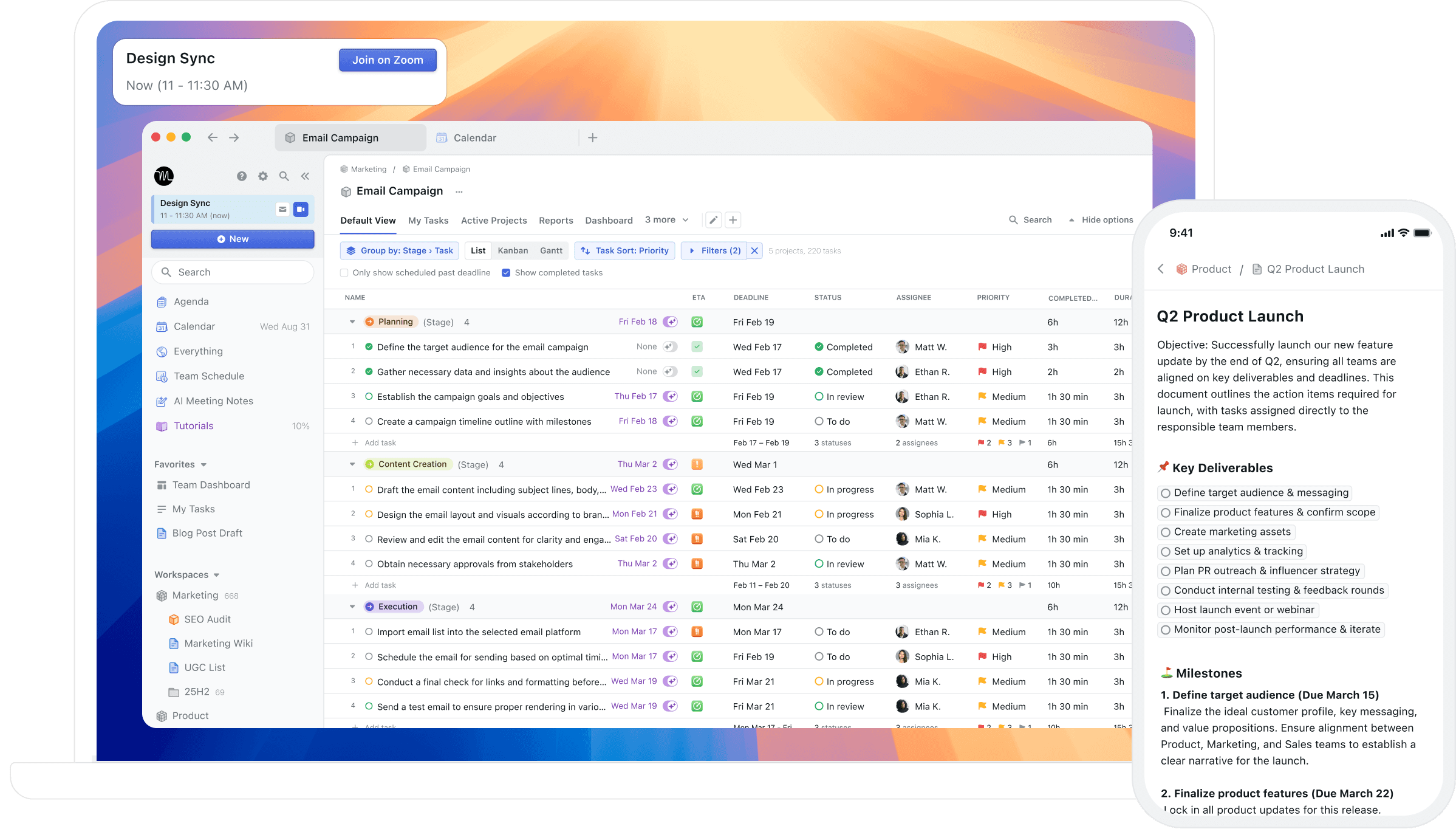
Motion's current desktop and mobile workspace shows the broad project-management surface alternatives must be judged against, not only its automatic calendar.
1. Akiflow is best for control and consolidation
Akiflow is the best Motion alternative for users who want a calendar-based command center without an algorithm continually rearranging the day. Its Universal Inbox pulls tasks from connected work tools into one place, and its calendar, time blocking, quick capture, keyboard shortcuts, daily ritual, and Aki assistant help turn that intake into a visible plan.
The switch makes the most sense when Motion's automation was not the main source of value. Someone may have liked seeing tasks beside meetings but disliked losing track of why a block moved. In Akiflow, the user chooses what becomes calendar time and can reschedule it directly. That is valuable when priorities depend on client context, energy, judgment, or politics that software cannot infer from a due date.
Akiflow is also a better fit when work already lives in email, Slack, Notion, Todoist, Asana, Linear, or other systems that should remain the source of truth. Tasks can be collected and planned without rebuilding every project inside the planner. The Akiflow comparison guide provides more context on this command-center approach.
The honest limitation is that Akiflow does not replace Motion's full automatic scheduling engine. People who want the app to find and continuously defend every task slot should look first at Reclaim or FlowSavvy. Akiflow is also premium software: pricing is $34 monthly or $19 per month billed yearly, with a seven-day trial.
2. Reclaim is best for calendar automation
Reclaim is the best alternative for users who want to keep automatic scheduling but do not need Motion's broader projects, docs, notes, and work-platform features. It works as an intelligent layer around the calendar, protecting focus time and scheduling tasks, habits, buffers, and meetings according to priorities, deadlines, availability, and configurable rules.
Its task model can break longer work into flexible blocks before a due date, while Habits can move within preferred windows when the calendar changes. Reclaim also integrates tasks from tools including ClickUp, Todoist, Asana, Jira, and Linear. This makes it a practical choice for teams that already have a project system and mainly need the calendar to defend execution time.
The weakness is consolidation. Reclaim can schedule connected tasks, but it is not designed around the same universal inbox and rapid triage experience as Akiflow. It may also require tuning before the calendar feels predictable. The current Reclaim plans include a free entry point; Starter is shown at $10 per seat per month annually or $12 monthly.
3. Sunsama is best for intentional planning
Sunsama is the best Motion alternative for people who want to replace automatic replanning with a calmer decision process. Its guided daily planning flow reviews unfinished work, imports tasks and meetings, asks for time estimates, checks the workload against a daily threshold, and helps the user defer excess commitments before timeboxing the final plan.
That workflow is particularly good for someone whose problem is overcommitment rather than scheduling mathematics. Sunsama makes the user confront how much work fits before the day begins, and its shutdown ritual provides a defined stopping point. It can pull tasks from connected project tools, email, and calendars while leaving those systems as sources of truth.
Sunsama is not a cheaper version of Motion, and it should not be evaluated that way. The Pro plan currently costs $17 per month billed yearly or $22 monthly. Choose it when the ritual itself is valuable. Avoid it when the whole point of leaving manual planning behind was to have software calculate the schedule.
4. FlowSavvy is best for affordable auto scheduling
FlowSavvy is the best budget alternative for an individual who still wants tasks placed and replaced automatically. It syncs Google, Outlook, and iCloud calendars, balances workload, splits tasks around events, warns about overcommitment, and automatically reschedules work when the plan changes. The interface and feature set are narrower than Motion's broader work platform.
That narrower scope is the appeal. A student, freelancer, or solo professional can enter tasks with durations and deadlines, set scheduling hours, and let FlowSavvy calculate the week without adopting project management, docs, or team capacity planning. The free plan includes unlimited auto-reschedules and schedules up to two weeks ahead.
FlowSavvy is less suitable for organizations that need complex project dependencies, shared operational workflows, or a universal work inbox. Its Pro plan is $14 monthly or $10 per month billed yearly, extending the scheduling range to eight weeks and adding priorities, task dependencies, and unlimited scheduling-hour profiles.
5. Morgen is best for complex calendar setups
Morgen is the best Motion alternative when the difficult part is coordinating several calendars rather than continuously rearranging tasks. It unifies Google, Microsoft, iCloud, Fastmail, and other accounts, connects task systems such as Notion, Todoist, Linear, ClickUp, Google Tasks, and Microsoft To Do, and supports time blocking with an AI Planner.
Morgen also includes booking pages, scheduling links, and broad platform coverage across Windows, macOS, Linux, mobile, and browser. That combination works well for consultants or operators with client and company accounts that must stay separate but need to be planned together. It can replace several calendar utilities without becoming a full project-management suite.
The limitation is that Morgen is neither the strongest automatic scheduler nor the fastest universal inbox. Choose it for calendar breadth and a controlled planning layer, not because it reproduces Motion's replanning behavior. The individual plan costs $30 monthly or $15 per month billed yearly, and paid plans include unlimited calendars and task integrations.
Which Motion alternative should you choose?
Choose Akiflow when Motion felt too automatic or too broad, but the task-and-calendar workspace was useful. Choose Reclaim when automatic calendar protection remains the goal. Choose Sunsama when you want a more deliberate relationship with workload. Choose FlowSavvy when price is the obstacle and individual auto-scheduling is enough. Choose Morgen when calendar fragmentation is the real problem.
A useful trial should include the week that usually defeats your current system. Add real deadlines, meetings, recurring routines, and one task large enough to split across several blocks. Then move a meeting and leave something unfinished. The replacement should either repair the schedule intelligently or make the manual repair clear. A clean onboarding screen proves almost nothing.
Finally, compare migration cost. Check which projects can remain in their existing tools, whether completed tasks sync back, how recurring work behaves, and what teammates need to change. The best alternative is not the one with the longest feature list. It is the one that removes the specific reason Motion stopped feeling trustworthy without creating a second planning job.
Frequently asked questions
What is the best Motion alternative overall?
Akiflow is the best overall alternative for professionals who want tasks, calendars, integrations, and time blocking in one fast workspace while retaining control over the schedule. Reclaim is the better choice when preserving Motion-style automation is more important than having a universal planning inbox.
What is the best free Motion alternative?
FlowSavvy and Reclaim are the strongest free options to test. FlowSavvy offers unlimited auto-reschedules and a two-week scheduling horizon on its free plan. Reclaim provides a free entry point for calendar optimization. Neither reproduces Motion's complete project, docs, and AI work platform.
Is Akiflow better than Motion?
Akiflow is better for users who want to collect work from several tools, time block it quickly, and understand every calendar decision. Motion is better for users who want priorities and deadlines converted into an automatically maintained schedule. Neither wins both planning models, so preference for control is decisive.
Which Motion alternative has the best automatic scheduling?
Reclaim is the strongest alternative for calendar automation around tasks, habits, focus time, buffers, and meetings. FlowSavvy is a simpler and less expensive option for individual task scheduling. Akiflow, Sunsama, and Morgen offer AI assistance, but they are better choices when the user wants more direct control.


