
Most projects don’t fail because the idea was bad; they fail because execution lacked structure.
Missed deadlines, unclear ownership, and scattered priorities are often symptoms of the same problem: the absence of a structured action plan for project delivery. Without it, even talented teams spin their wheels. Work gets duplicated, priorities shift without warning, and the project slowly drifts off course.
This guide breaks down exactly how to create a project management action plan that holds up under real-world conditions. Whether you’re a founder managing a product launch, a developer navigating a sprint, or a freelancer juggling multiple clients, the frameworks and templates here will help you move from ideas to outcomes with confidence.
Key Takeaways
Turn each project goal into specific tasks with one accountable owner, realistic deadlines, and visible dependencies before scheduling the work.
Connect project milestones to weekly priorities and daily calendar blocks, using a prioritization method to keep lower-value work from crowding out essential tasks.
Review the action plan every week and whenever scope or capacity changes; update blockers, ownership, and deadlines so the plan reflects current work.
Also Read: What Is a Project Timeline: Designing a Project Timeline
What Is an Action Plan for Project Management?
A project management action plan is a structured document that translates a project goal into specific, time-bound tasks with clear ownership and measurable outcomes. It bridges the gap between strategy and execution. When you’re drowning in deadlines, your first instinct might be to wish someone could just do my project for me. However, learning to build a proper action plan is the next best thing.
Think of it as the operating manual that guides how your project gets executed. It tells your team not just what needs to be done, but who is responsible, when it’s due, what resources are required, and how progress will be measured.
How It Differs from a Project Plan
Many professionals confuse a project plan with an action plan. They serve different purposes.
A project plan is the high-level roadmap. It covers scope, budget, timelines, and stakeholder communication.
An action plan for project execution goes deeper. It breaks each milestone into granular tasks, assigns them to individuals, and schedules them into specific timeframes.
In short, a project plan tells you where you’re going. An action plan tells you exactly how to get there, step by step.
Why Busy Professionals Need One
Without a detailed action plan, projects collapse under the weight of ambiguity. Team members aren’t sure what to tackle next. Managers spend hours chasing updates. Deadlines slip, not because people aren’t working hard, but because effort isn’t being directed effectively.
A well-built action plan eliminates that ambiguity. It creates a shared reality where every stakeholder knows the current status, the next step, and who owns what.
The Core Components of a Detailed Action Plan
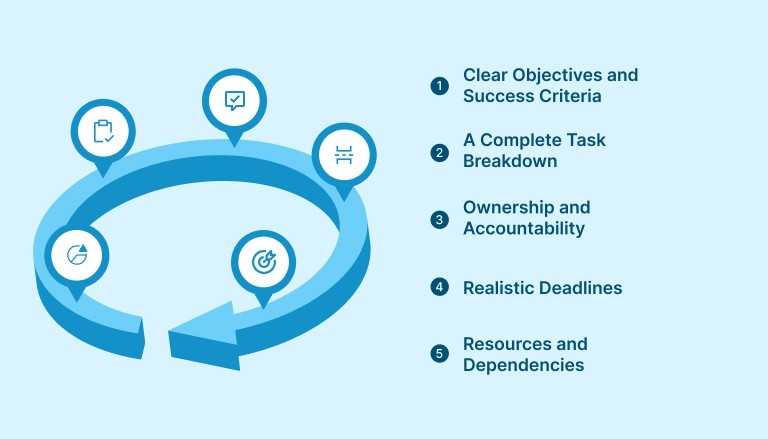
Before building your action plan, it’s important to understand what goes into one. A detailed action plan is not a simple to-do list. It’s a structured framework with interconnected parts.
1. Clear Objectives and Success Criteria
Every action plan starts with a goal. But a vague goal leads to vague execution. Use the SMART framework to make your objective specific, measurable, achievable, relevant, and time-bound.
For example, instead of writing “launch new website,” write “launch redesigned company website with five core service pages by October 15, achieving a page load time under two seconds.”
Success criteria should be defined upfront before tasks are created. Ask: How will you know this project is complete and successful? Document that answer before any tasks are created.
2. A Complete Task Breakdown
Once the goal is clear, break it into every task required to reach it. This process is sometimes called creating a Work Breakdown Structure (WBS). The goal is to make every item small enough to be actionable within a single work session.
Identify all deliverables required to meet the objective
Break each deliverable into specific, assignable tasks
Estimate the time required for each task
Flag any tasks that depend on the completion of others
Avoid vague entries like “work on design” or “handle client communication.” Instead, write “create three homepage mockup options in Figma” or “send project kickoff summary email to client by Tuesday noon.”
3. Ownership and Accountability
Every task needs one clear owner, not two and not a team. One person is accountable for its completion.
Assign tasks with the individual’s name, not just their role. “Marketing team lead” is less effective than “Sarah, content strategist.”
4. Realistic Deadlines
Deadlines create urgency and prevent tasks from drifting indefinitely. But unrealistic deadlines lead to burnout and undermine trust in the planning process.
Work with team members to set deadlines collaboratively. Factor in dependencies, existing workloads, and buffer time for unexpected delays. A rule of thumb: add 20 to 30 per cent more time than your initial estimate, especially for creative or technical tasks.
5. Resources and Dependencies
A strong action plan identifies what’s needed before a task can begin and what it unlocks once it’s done.
List required resources: software access, budget, team capacity, vendor inputs
Map task dependencies clearly so the team knows the correct order of operations
Identify potential bottlenecks early and plan around them
How to Build an Action Plan for Project Success: A Step-by-Step Workflow
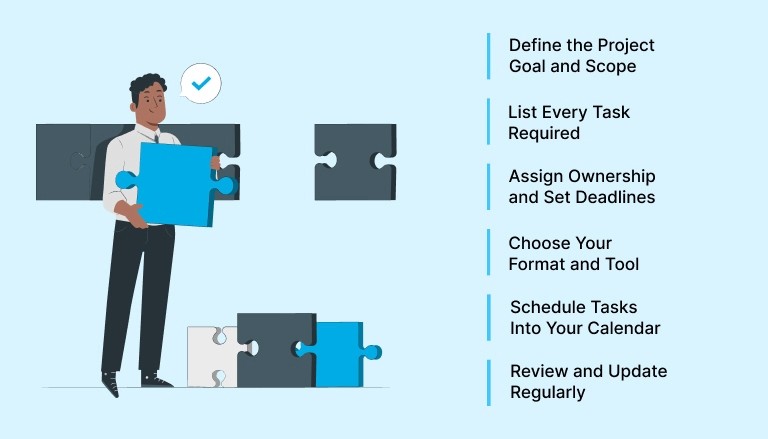
Now that you understand the components, here’s how to build your action plan from scratch in a structured, repeatable way.
Step 1: Define the Project Goal and Scope
Start with one clear statement of what the project is meant to achieve and what it will not include. Scope creep is one of the most common causes of project failure, and it almost always starts with unclear boundaries.
Document the following:
The primary objective and why it matters to the business
The expected deliverables and their quality standards
What is explicitly out of scope
Key stakeholders and their expectations
Step 2: List Every Task Required
Conduct a brainstorming session with your team to capture every task that needs to happen. Do not filter at this stage. Include everything, from internal reviews to third-party vendor coordination to QA checks.
Once you have your full list, group related tasks into logical phases or milestones. This makes the plan easier to navigate and helps you see the project as a series of manageable stages rather than one overwhelming mass of work.
Step 3: Assign Ownership and Set Deadlines
Go through each task and assign a single owner. Then set a realistic deadline based on dependencies and team capacity.
A practical approach:
Start with your final deadline and work backward to assign intermediate due dates
Identify which tasks are on the critical path (tasks where delays directly impact the final deadline)
Build buffer time into the critical path to absorb unexpected delays
Step 4: Choose Your Format and Tool
Your action plan is only useful if people actually use it. Choose a format that matches your team’s working style.
Options range from a simple spreadsheet to a dedicated project management platform. What matters most is that the format makes it easy to update status, reassign tasks, and flag blockers in real time.
Must Read: How to Manage Multiple Projects: 6 Tools You Need
Step 5: Schedule Tasks Into Your Calendar
This step is where most action plans break down. Teams create a detailed plan but fail to translate it into scheduled work time. Tasks sit in a to-do list but never get done because no one blocked time to do them.
Time blocking is the solution. Each task in your action plan should have a corresponding time block in your calendar. If it’s not on the calendar, it’s just a wish.
For example, if “write first draft of Q3 report” is due Friday, block two hours on Wednesday morning to write it. That block becomes a non-negotiable appointment with the work. Platforms like Akiflow let you drag tasks directly from your inbox into calendar slots, making it easy to translate your action plan into a scheduled work day without switching between tools.
Step 6: Review and Update Regularly
An action plan is a living document. Schedule a weekly review to assess progress, reassign tasks, adjust deadlines, and flag new risks.
Without regular reviews, plans become outdated and teams lose trust in them. A weekly check-in of 15 to 20 minutes is enough to keep a plan accurate and actionable.
Weekly Action Plan Template for Project Teams
A weekly action plan template gives your team a repeatable structure for planning and executing work within a defined seven-day window. It’s especially useful when working toward a longer-term project goal, because it breaks the bigger roadmap into week-sized chunks that feel manageable.
Here’s a simple weekly action plan template structure you can adapt:
Weekly Action Plan Template
Column | What to Include |
Task | Specific, actionable task description |
Owner | Name of the person responsible |
Priority | High / Medium / Low |
Deadline | Due date within the current week |
Status | Not started / In progress / Complete / Blocked |
Notes | Dependencies, blockers, or links to resources |
How to Use the Weekly Action Plan Effectively
Filling in the template is only the first step. The following habits make a weekly action plan work in practice:
Monday morning kickoff: Review the template as a team to align on priorities for the week. Identify any tasks that depend on others’ completion first.
Mid-week check-in: A brief 10-minute sync on Wednesday helps catch blockers before they become delays.
Friday review: Mark completed tasks, moved unfinished items to next week with updated deadlines, and noted any lessons learned.
The weekly action plan works best when it flows directly from the overall project action plan. Each week’s tasks should connect to a specific project milestone, so daily work always ties back to a larger goal.
Also Read: 7 Simple To-Do List Templates to Master Time Management
Daily Action Plan Template: Turning Project Tasks Into Focused Work
A daily action plan zooms in further, giving individuals a clear structure for each workday. While the weekly plan manages momentum at the project level, the daily plan manages execution at the personal level.
What to Include in a Daily Action Plan Template
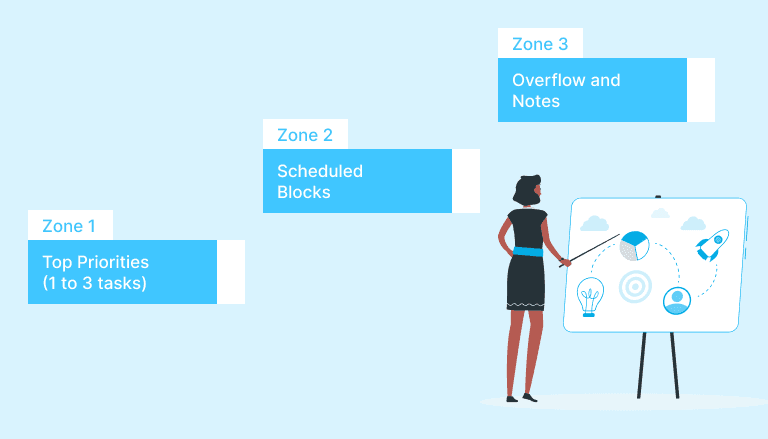
A practical daily action plan template contains three zones:
Zone 1: Top Priorities (1 to 3 tasks)
These are the most important project-related tasks for the day. They should directly advance a current milestone. Limit this zone to no more than three items. If everything is a priority, nothing is.
Zone 2: Scheduled Blocks
List your time blocks for the day, including meetings, deep work sessions, and admin time. Each block should have a start time, an end time, and an associated task. This turns the abstract task list into a concrete schedule.
Zone 3: Overflow and Notes
Capture any tasks that emerge throughout the day but don’t need immediate action. Review these at the end of the day and add them to the weekly plan if they are project-relevant.
Aligning the Daily Plan With the Project Action Plan
The most productive professionals use a layered planning approach:
The project action plan provides the overall roadmap and milestones
The weekly action plan breaks milestones into week-sized objectives
The daily action plan template turns weekly objectives into scheduled daily tasks
This three-layer system ensures that every hour of focused work connects directly to a project outcome. It eliminates the common problem of “staying busy without making progress.”
Also Read: Time Blocking for Beginners: How to Master Your Schedule in 2026
How to Prioritize Tasks Within Your Work Action Plan
Having a list of tasks isn’t enough. The order in which you tackle them matters enormously. Prioritization ensures that the most valuable work gets done first, especially when time and resources are limited.
Several proven frameworks can help.
The Eisenhower Matrix
This method categorizes every task into one of four quadrants:
Urgent and important: Do immediately. These are the tasks that move the critical path.
Important but not urgent: Schedule these. These are usually high-impact project tasks that require focused work blocks.
Urgent but not important: Delegate these where possible. They create noise but not progress.
Neither urgent nor important: Eliminate or defer these entirely.
Applying this matrix to your action plan for project tasks helps prevent the common trap of spending the day on reactive, low-value work while high-priority deliverables sit untouched.
The MoSCoW Method
This framework is especially useful for project managers balancing multiple stakeholders:
Must have: Non-negotiable deliverables that define project success
Should have: Important but not critical to the first release or milestone
Could have: Nice-to-have features or tasks that add value but won’t block progress
Won’t have (this time): Explicitly deprioritised items, moved to a future phase
Using MoSCoW in your detailed action plan gives every stakeholder a clear understanding of what the team is committed to delivering versus what is aspirational.
Must Read: The Best Task Prioritization Strategies for Maximum Productivity
Common Mistakes That Kill a Project Action Plan
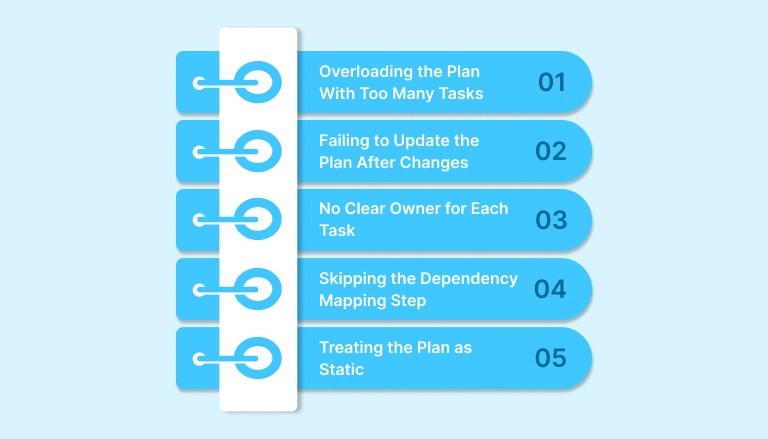
Even well-intentioned plans fail. Knowing the most common pitfalls helps you build plans that hold up when reality gets complicated.
1. Overloading the Plan With Too Many Tasks
When every task is on the plan, the plan becomes unmanageable. Teams lose sight of priorities and start making arbitrary decisions about what to work on. Keep the active task list focused on the current sprint or milestone. Future tasks belong in a backlog, not the active plan.
2. Failing to Update the Plan After Changes
Projects evolve. Scope changes, timelines shift, and team capacity fluctuates. An outdated action plan is worse than no plan at all, because it creates false confidence while the project drifts.
Commit to a weekly update rhythm. Anyone on the team should be able to look at the plan at any time and trust that what they see reflects reality.
3. No Clear Owner for Each Task
Shared ownership leads to tasks falling through the cracks. If two people are listed as owners, each will assume the other is handling it. Assign one owner per task, every time, without exception.
4. Skipping the Dependency Mapping Step
Jumping into execution without understanding task dependencies is a fast route to bottlenecks. If a developer can’t start building until the designer delivers mockups, that dependency needs to be visible in the plan. Otherwise, the developer might be blocked for days with no warning.
5. Treating the Plan as Static
The most effective work action plans are reviewed, revised, and refined continuously. They are decision-making tools, not filing documents. Build a review habit into your workflow and treat every update as progress, not a sign that the original plan was wrong.
6. Ignoring Security in Remote Collaboration
Remote and distributed teams access shared plans and documents from different locations. Use company-approved access controls, review sharing permissions, and follow your organization’s requirements for connecting to project systems.
How to Measure Progress and Keep Your Action Plan on Track
Building the plan is only half the job. Measuring progress is what keeps the team aligned and the project moving.
Define Milestones and Leading Indicators
Milestones mark the completion of a major phase or deliverable. They create natural checkpoints for evaluating progress and communicating status to stakeholders.
Beyond milestones, identify leading indicators: early signals that suggest whether you’re on track before you reach a milestone. For example, if the goal is to launch a new feature in six weeks, a leading indicator might be completing 80 percent of the design phase in the first two weeks.
Hold a Weekly Project Review
A structured weekly review meeting serves three purposes:
Progress check: Which tasks were completed? Which are behind?
Blocker identification: What’s preventing forward movement and how can it be resolved?
Reprioritization: Have any new tasks emerged that need to be added? Have priorities shifted?
Keep these meetings short and structured. Thirty minutes with a clear agenda is more effective than an hour of open discussion.
Use a Status Dashboard
Whether it’s a shared spreadsheet, a project board, or a Kanban view, a visible status dashboard lets the entire team see the project’s status without asking. Update it after every task is completed and every blocker is identified.
Pairing your status dashboard with a centralized task and calendar tool like Akiflow helps keep project tasks, calendar blocks, and daily priorities visible in one place, so nothing slips through the cracks during the review cycle.
Transparency creates accountability. When everyone can see what’s done and what’s not, the social pressure to follow through increases naturally.
Also Read: Best Task Management Tools and Techniques for 2025
Conclusion
A project management action plan is not a luxury for large enterprises. It’s a practical necessity for anyone who wants to deliver work consistently, meet deadlines, and reduce the chaos of managing complex projects.
The most effective action plans combine a clear goal, a complete task breakdown, single ownership, realistic deadlines, and a regular review cadence. When layered across project, weekly, and daily planning levels, they give individuals and teams a clear line of sight from daily effort to long-term outcomes.
Building this system requires time up front, but it saves far more time during execution. The professionals who invest in a structured action plan for project management consistently deliver, while others wonder where the week went.
Try Akiflow today to centralize your tasks, block your time, and turn your action plan into results. Start your free trial and take control of your schedule from day one.
Frequently Asked Questions
1. What is an action plan for project management?
An action plan for project management is a structured document that breaks a project goal into specific tasks, assigns owners, sets deadlines, and maps dependencies. It goes beyond a high-level project plan by turning strategy into scheduled, executable steps that guide daily and weekly work.
2. How is a weekly action plan different from a daily action plan template?
A weekly action plan organizes tasks and priorities across a full seven-day window, keeping work aligned to project milestones. A daily action plan template zooms further in, structuring an individual’s specific work blocks, top priorities, and overflow tasks for a single day. Both work best when used together as part of a layered planning system.
3. How often should a project action plan be updated?
A project action plan should be reviewed and updated at least once per week. High-velocity projects or those with shifting stakeholder requirements may benefit from more frequent updates. The goal is to ensure the plan always reflects the current state of the project so the team can trust and act on it.
4. What is the most common reason action plans fail?
The most common reason is that tasks are never scheduled into actual calendar time. An action plan without time blocks remains an intention, not a commitment. The second most common reason is lack of clear ownership: when tasks are assigned to “the team” rather than a specific person, accountability disappears, and tasks fall through the cracks.
5. Can I use a simple spreadsheet as a work action plan?
Yes. A spreadsheet with columns for task, owner, deadline, priority, status, and notes is a perfectly effective work action plan for small projects or individual contributors. The format matters less than the consistency with which it’s maintained and reviewed. As projects scale in complexity, dedicated project management tools offer better visibility and collaboration features.


