

Your day does not fall apart because you lack discipline. It falls apart because your tasks live in five different places, your calendar tells a different story than your to-do list, and notifications keep deciding what deserves your attention. By noon, you feel busy but unsure what actually moved forward.
Most professionals try to fix this with more tools, longer lists, or stricter discipline. But productivity is not about squeezing more into your day. It is about designing a system that makes the right work obvious and easy to execute.
To streamline daily tasks means designing a system that captures, prioritizes, schedules, and reviews your work so nothing important gets lost or delayed.
In this guide, you will learn a practical 10-step framework to capture everything, prioritize clearly, time block realistically, automate repetitive work, and build daily and weekly rituals that keep your workflow clean and under control.
Key Takeaways
Capture all tasks into one trusted system to reduce mental clutter.
Turn vague tasks into clear, time-bound next actions.
Time-block priorities before reactive work takes over.
Automate repetitive inputs to eliminate unnecessary manual effort.
Use daily and weekly reviews to keep your workflow aligned.
Why Most Productivity Advice Fails?
Most productivity advice focuses on tactics rather than systems, leaving busy professionals to juggle disjointed lists, calendars, and notifications that never align. This short section explains the root problems so you can see why system design matters before you apply specific tactics.
Here is a practical, system-based approach.
To-do Lists Without Calendars: Tasks pile up with no timing, creating a false sense of progress and constant overwhelm.
Calendars Without Tasks: A calendar full of meetings but no action items creates blind spots for deep work and deliverables.
Tools That Do Not Talk to Each Other: Switching apps increases cognitive load and wastes minutes that add up across the day.
Vague Task Descriptions: If a task lacks a clear next action, it will sit unfinished and block momentum.
Advice That Relies on Perfect Discipline: Systems should reduce reliance on willpower by making the right action obvious and easy.
Unified Systems Reduce Friction: Connecting capture, scheduling, and automation makes focus predictable, and task-calendar tools like Akiflow make that practical.
Also Read: What Is Workflow Automation Software and Why Teams Need It?
The 10-Step Framework To Streamline Daily Tasks
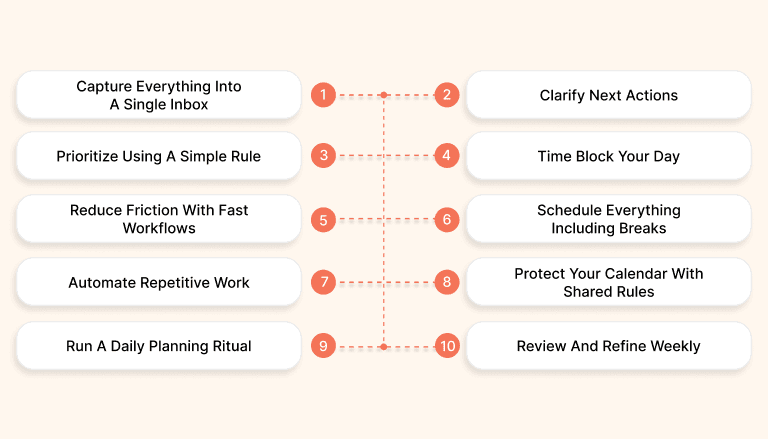
Streamlining your day is not about working harder or adding more tools. It is about building a clear, repeatable system that connects capture, prioritization, scheduling, and review into one intentional workflow that reduces friction and protects focus.
Here are 10 practical steps to help you create a more controlled, efficient workday.
Step 1: Capture Everything Into A Single Inbox
When tasks live across email, Slack, notes apps, and your head, you waste mental energy trying to remember what matters. A single trusted inbox removes that friction by giving every task, follow-up, and idea one clear destination you review daily.
To build this habit effectively, start with a simple capture rule and a consistent processing routine.
Adopt One Capture Destination: Route every task, meeting action, and quick idea into one inbox instead of scattering them across tools.
Follow The Two Minute Rule: If something takes less than two minutes, complete it immediately to prevent backlog buildup.
Batch Process Once Daily: Review new items at a scheduled time and avoid constantly checking throughout the day.
Use Clear Triage Categories: Decide quickly whether to do, defer, delegate, or delete each item.
Tag By Project Or Priority: Add lightweight labels so filtering and planning later takes seconds instead of minutes.
Trust the System Fully: Once everything is captured in one place, stop relying on memory.
Step 2: Clarify Next Actions
Vague tasks are silent productivity killers because they force you to think before you act. When a task is unclear, your brain delays starting it. Turning every entry into a concrete next action removes hesitation and makes scheduling fast and frictionless.
To make this practical, rewrite each task so it is specific, visible, and time-bound.
Use a Clear Action Verb: Start every task with a verb such as draft, call, review, design, or finalize to remove ambiguity.
Define the Outcome: Specify what “done” looks like so you know exactly when the task is complete.
Estimate the Duration: Add a realistic time estimate to improve calendar accuracy and prevent overbooking.
Break Down Large Tasks: Convert complex projects into 15- to 45-minute sub-tasks that are easier to time-block.
Replace Vague Entries Immediately: Change “Prepare report” into “Draft Q1 report outline, 30 minutes” before scheduling it.
Eliminate Multi-Step Tasks: If a task contains the word “and,” split it into separate actionable items.
Read Also: Daily Work Management: Steps to Plan and Control Your Day
Step 3: Prioritize Using A Simple Rule
Without a clear prioritization method, your day gets dictated by notifications, urgent emails, and other people’s agendas. A simple, repeatable rule prevents decision paralysis and ensures your most important work receives attention before reactive tasks take over.
To make prioritization sustainable, choose one lightweight framework and apply it consistently every morning.
Pick A Daily Top Three: Identify the three tasks that must be completed today, regardless of distractions or unexpected requests.
Use Impact Versus Effort Thinking: Focus first on tasks that create meaningful results relative to the time invested.
Separate Deep Work From Admin: Distinguish high-value strategic tasks from operational or maintenance activities.
Re-Evaluate After Major Meetings: Adjust priorities if new information or urgent responsibilities emerge.
Downgrade Low-Value Tasks Intentionally: Move non-essential items to later dates instead of letting them compete for attention.
Align With Weekly Goals: Ensure your daily priorities connect directly to broader weekly or quarterly objectives.
Step 4: Time Block Your Day
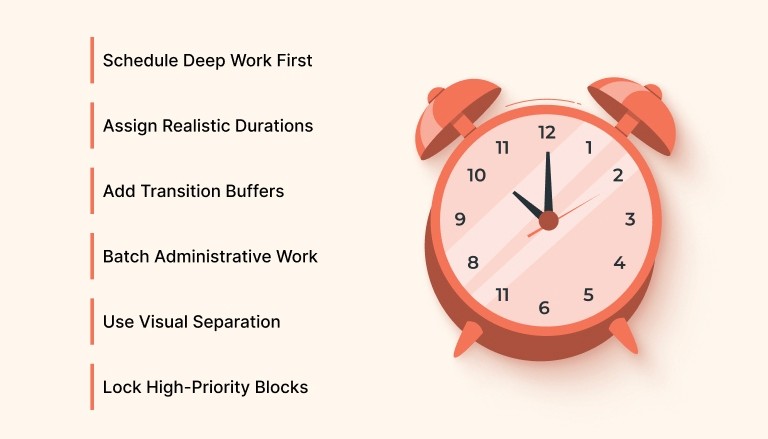
Time blocking transforms a long task list into a realistic daily plan by assigning specific work to specific hours. Instead of hoping important tasks get done, you deliberately reserve uninterrupted time for them, protecting deep work from meetings, messages, and reactive requests.
To implement this effectively, move tasks from your list into your calendar with clear durations and built-in buffers.
Schedule Deep Work First: Block 60 to 90-minute sessions for your most cognitively demanding tasks before filling the day with meetings.
Assign Realistic Durations: Estimate how long each task will take and avoid stacking more hours than your calendar can support.
Add Transition Buffers: Insert 5 to 15-minute gaps between meetings to reset, document notes, and prepare for the next task.
Batch Administrative Work: Reserve specific time slots for email, approvals, and quick replies instead of scattering them throughout the day.
Use Visual Separation: Apply color-coding or labels to distinguish focus blocks, meetings, and personal time at a glance.
Lock High-Priority Blocks: Treat them as non-negotiable calendar commitments.
Ready to stop juggling separate to-do lists and calendars?
Try bringing your tasks and calendar into one unified workflow with Akiflow so scheduling becomes realistic instead of reactive.
Step 5: Reduce Friction With Fast Workflows
Every extra click, tab switch, or mouse movement adds invisible friction to your day. Over time, that friction compounds into lost focus and broken momentum. Fast workflows eliminate micro-delays by letting you create, edit, and schedule tasks instantly without interrupting your thinking.
To make this practical, commit to mastering quick-input tools and repeatable shortcuts that accelerate common actions.
Learn the Command Bar: Use a universal command interface to create tasks, schedule events, and jump between views in seconds.
Adopt Keyboard Shortcuts: Replace repetitive mouse actions with shortcuts for capturing, tagging, planning, and completing tasks.
Create Reusable Templates: Build quick templates for recurring meeting notes, follow-ups, or standard workflows.
Use Bulk Editing Actions: Select multiple tasks to reschedule, prioritize, or complete them together instead of one by one.
Keep A Shortcut Cheat Sheet: Maintain a visible list of your most used shortcuts until they become automatic.
Minimize Context Switching: Capture and schedule directly from one interface instead of bouncing between multiple tools.
Step 6: Schedule Everything Including Breaks
Most professionals schedule meetings but leave breaks, transitions, and planning time to chance. This creates rushed handoffs, mental fatigue, and reactive afternoons. When breaks and buffers are treated as real calendar commitments, your energy stabilizes and your schedule becomes more realistic.
To make this work, deliberately place recovery and planning blocks into your calendar just like you would any important meeting.
Block Transition Buffers: Add 10-minute gaps before or after meetings to document notes and mentally reset.
Schedule a Daily Review Session: Reserve time at the end of each day to plan tomorrow’s priorities and time blocks.
Create a Weekly Planning Ritual: Add a recurring weekly session to review goals, deadlines, and upcoming commitments.
Protect Lunch And Recovery Time: Treat meals and short breaks as fixed appointments to prevent burnout and decision fatigue.
Limit Back-To-Back Meetings: Set calendar rules that prevent continuous meetings without breathing room.
Use Recurring Blocks Strategically: Automate repeat planning and focus sessions so they remain consistent each week.
Step 7: Automate Repetitive Work
Repetitive administrative tasks quietly consume hours each week and drain attention from meaningful work. Automation reduces manual effort by routing recurring items into structured workflows, ensuring important inputs are captured and processed without constant copying, forwarding, or retyping.
To implement this effectively, connect your core tools and define simple rules that move information automatically into your task system.
Auto Create Tasks From Email: Turn starred or labeled emails into actionable tasks so follow-ups never get buried in your inbox.
Capture Messages From Team Chat: Convert important Slack or Microsoft Teams messages into tasks without switching contexts.
Set Up Recurring Task Templates: Automate weekly reports, invoicing, reviews, or check-ins, so they regenerate automatically.
Use Integration Platforms Wisely: Connect apps through Zapier or native integrations to eliminate manual copying between tools.
Apply Rule-Based Imports: Define filters that automatically tag, assign, or categorize incoming tasks for faster planning.
Review Automations Weekly: Audit your rules to ensure they remain relevant and are not creating unnecessary noise.
Step 8: Protect Your Calendar With Shared Rules
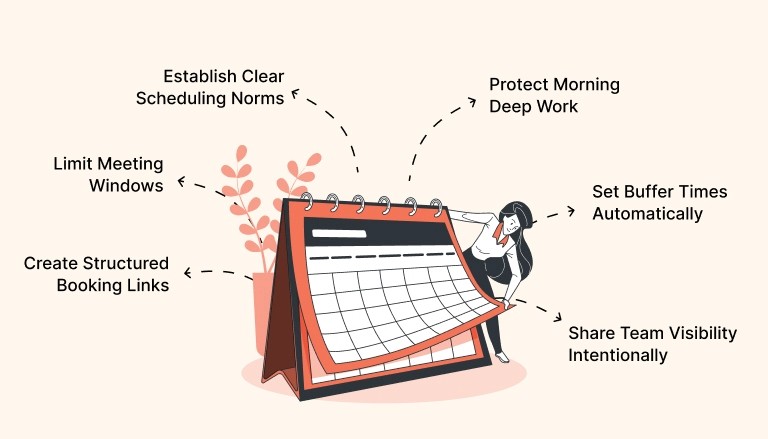
An unprotected calendar quickly fills with scattered meetings, last-minute bookings, and interruptions that fragment your focus. Without clear boundaries, your schedule becomes reactive instead of intentional. Shared rules and booking structures help you maintain control while still staying accessible to teammates and clients.
To make this sustainable, define meeting guardrails and publish structured availability instead of offering open-ended access.
Create Structured Booking Links: Offer separate links for 15, 30, and 60-minute meetings so others can choose predefined time formats.
Limit Meeting Windows: Restrict meetings to specific hours of the day to preserve protected focus blocks.
Protect Morning Deep Work: Keep high-concentration hours unavailable for casual scheduling requests.
Set Buffer Times Automatically: Add built-in gaps before and after meetings to avoid back-to-back overload.
Share Team Visibility Intentionally: Use shared calendar views so collaborators can see availability without disrupting focus time.
Establish Clear Scheduling Norms: Communicate response times, preferred meeting lengths, and booking expectations to reduce ambiguity.
Step 9: Run A Daily Planning Ritual
Without a consistent daily reset, priorities drift, and reactive work takes control. A short morning and evening ritual keeps your system aligned, reduces decision fatigue, and ensures your most important tasks are intentionally scheduled instead of left to chance.
To make this sustainable, commit to a simple 10-minute morning planning session and a 10-minute evening review every workday.
Select Your Daily Top Three: Identify the three outcomes that must be completed and time-block them before checking messages.
Review Calendar Commitments: Scan meetings and deadlines to adjust workload realistically before the day accelerates.
Triage Your Inbox Each Evening: Process new tasks using "do," "defer," "delegate," or "delete" so nothing lingers overnight.
Prepare Tomorrow’s Schedule: Move priority tasks directly into specific calendar blocks to eliminate morning indecision.
Use a Repeatable Checklist: Follow the same short sequence daily to build consistency and reduce reliance on memory.
Reflect On What Worked: Spend one minute noting wins or friction points to continuously refine your workflow.
Step 10: Review And Refine Weekly
Even the best productivity system drifts without regular maintenance. A weekly review keeps your workflow clean, aligned with goals, and grounded in reality. It prevents task buildup, improves time estimates, and ensures your calendar reflects current priorities rather than outdated assumptions.
To keep your system healthy, schedule a dedicated 30 to 60-minute weekly reset and treat it as a non-negotiable appointment.
Archive Completed Projects: Remove finished initiatives and clear low-value tasks so your system stays focused and relevant.
Update Active Priorities: Review ongoing projects and confirm they still align with current goals and deadlines.
Adjust Recurring Blocks: Modify focus sessions, meetings, and planning rituals based on what actually worked during the week.
Refine Automation Rules: Improve filters, integrations, and recurring task templates to eliminate unnecessary noise.
Correct Time Estimates: Compare planned durations with actual completion times to improve future scheduling accuracy.
Select One Process Improvement: Identify a small workflow change to test next week and measure its impact deliberately.
Conclusion
Productivity is not about doing more things in less time. It is about doing the right things at the right time with clarity and control. When you capture everything, clarify next actions, prioritize intentionally, and protect your calendar, your workday shifts from reactive chaos to structured momentum.
If you want one place to bring tasks, calendars, and planning together, try Akiflow. Start your free trial and experience a unified workflow that helps you focus deeply, execute consistently, and end each day knowing what truly moved forward.
FAQs
1. What is the biggest mistake people make when managing daily tasks?
The biggest mistake is separating tasks from the calendar. Without scheduling tasks into time blocks, to-do lists grow endlessly, and important work gets postponed.
2. How long does it take to build a streamlined daily workflow?
Most professionals notice improvements within one to two weeks by consistently applying capture, prioritization, and daily planning rituals without changing their entire tool stack.
3. Do I need special software to follow these 10 steps?
You can apply the principles with basic tools, but a unified system like Akiflow makes capture, scheduling, and automation significantly easier.
4. What is time blocking, and why is it effective?
Time blocking assigns tasks to specific calendar slots, protecting focus time and ensuring priorities are completed instead of getting buried under reactive work.
5. How do daily and weekly reviews improve productivity?
Daily and weekly reviews prevent backlog buildup, refine priorities, improve time estimates, and keep your workflow aligned with bigger goals.


